
An abandoned cart is the online version of someone leaving a full basket by the till and wandering out of the shop. Online, the assistant who'd catch them at the door is your abandoned cart email sequence, and on most stores he's asleep in the back.
I've lost count of the stores where the whole cart flow is one "You forgot something!" email running since launch, with a 15% code nobody asked for. Baymard's 2026 roundup of 50 studies puts the average cart abandonment rate at 70.22%, so roughly seven in ten carts never reach the thank-you page.
Get the sequence right and it becomes one of the best-paid emails you send, without you touching it once it's live. It also stops reminding people who've already paid.
This article covers all five emails and their timing, what to say in each, the Klaviyo setup, where a discount fits and how to judge the results. You can stop reading the moment your flow is fixed.
tl;dr
- A good abandoned cart email sequence is up to five emails over about a week, and the offer first appears in email 4.
- Send email 1 two to four hours after checkout stalls. Klaviyo's pre-built flow waits four hours.
- Trigger on Started Checkout and add the filter "Placed Order zero times since starting this flow" so buyers drop out.
- Name the exact product in every email and keep one button that rebuilds the cart.
- Keep discounts for first-time buyers late in the flow, and judge it on conversion and revenue per email rather than opens.
What should an abandoned cart email sequence include?
An abandoned cart email sequence should include the exact items left behind, one button back to the saved cart, a reason to finish that changes with each email and an exit the moment someone buys. Brand banners and "you might also like" grids are optional, and usually they just get in the way.
Think of it as one conversation spread over a week, where each email answers the next question a hesitant shopper has.
The parts every abandoned cart email needs:
- The product block. Image, name, variant and price, pulled from the cart. Klaviyo's pre-built flows include a dynamic block that repeats for each item.
- One checkout button. It should rebuild the cart, not drop them on your homepage to start again.
- A reason that changes. Reminder, then reassurance, then timing, then an offer. The same reminder five times in a row mostly earns unsubscribes.
- A reply path. Send from an inbox someone actually reads, because shoppers with a sizing question will hit reply.
- An exit rule. The flow stops the moment an order comes in, which in Klaviyo is a profile filter you set once.
The full 5-email abandoned cart sequence at a glance
The full abandoned cart sequence runs up to five emails, from a plain reminder a few hours after checkout stalls to a last call around day six, and the offer first appears in email 4. Here's the whole thing on one screen.
| When, and its job | |
|---|---|
| 1. Reminder | 4 hours. Show the cart, no discount |
| 2. Reassurance | Day 1. Answer the top doubt |
| 3. Reason to decide | Day 2. Real stock or timing facts |
| 4. First-order offer | Day 3. Small incentive, new buyers only |
| 5. Last call | Day 6. Same offer, then stop |
The timing comes from Klaviyo's abandoned cart flow guide, which recommends a first message two to four hours after someone starts checkout and a second one 20 to 48 hours later. Its pre-built flow starts with a four-hour delay, which is a sensible default if you've no reason to change it.
Klaviyo's own research, in the same guide, found that two or three abandoned cart messages perform best. So I build emails 1 to 3 first and only add 4 and 5 once those are working and converting.
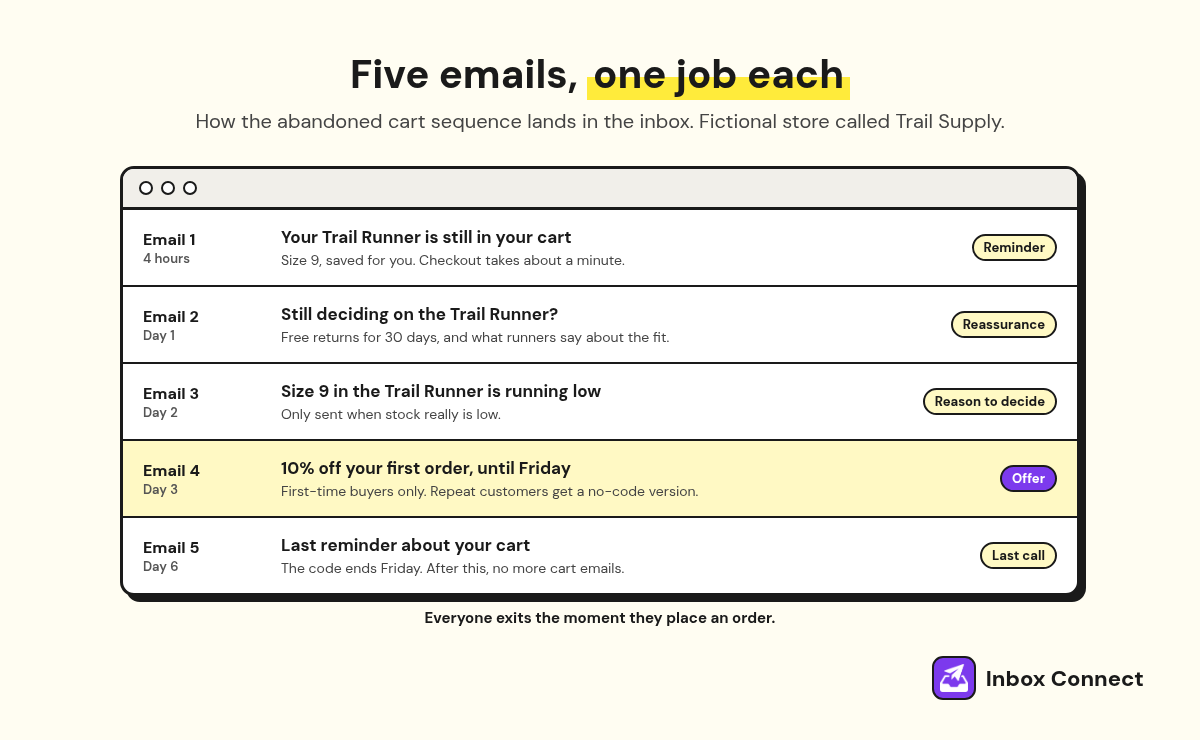
For the subject lines themselves, my list of abandoned cart email subject lines has tested patterns for each of these five slots. My habit is to write all five in one sitting and read them top to bottom. If two say the same thing, one of those emails doesn't have a job yet.
What to say in each abandoned cart email
Say one new thing in each abandoned cart email: email 1 reminds, email 2 reassures, email 3 gives a real reason to decide, email 4 makes a small offer and email 5 closes the loop. The product block and the button stay the same in all five, so the shopper always knows what they're looking at.
Email 1, the reminder. Show the cart, name the item and get out of the way. Klaviyo's guide says to include only the abandoned products, because anything else pulls attention away from checkout.
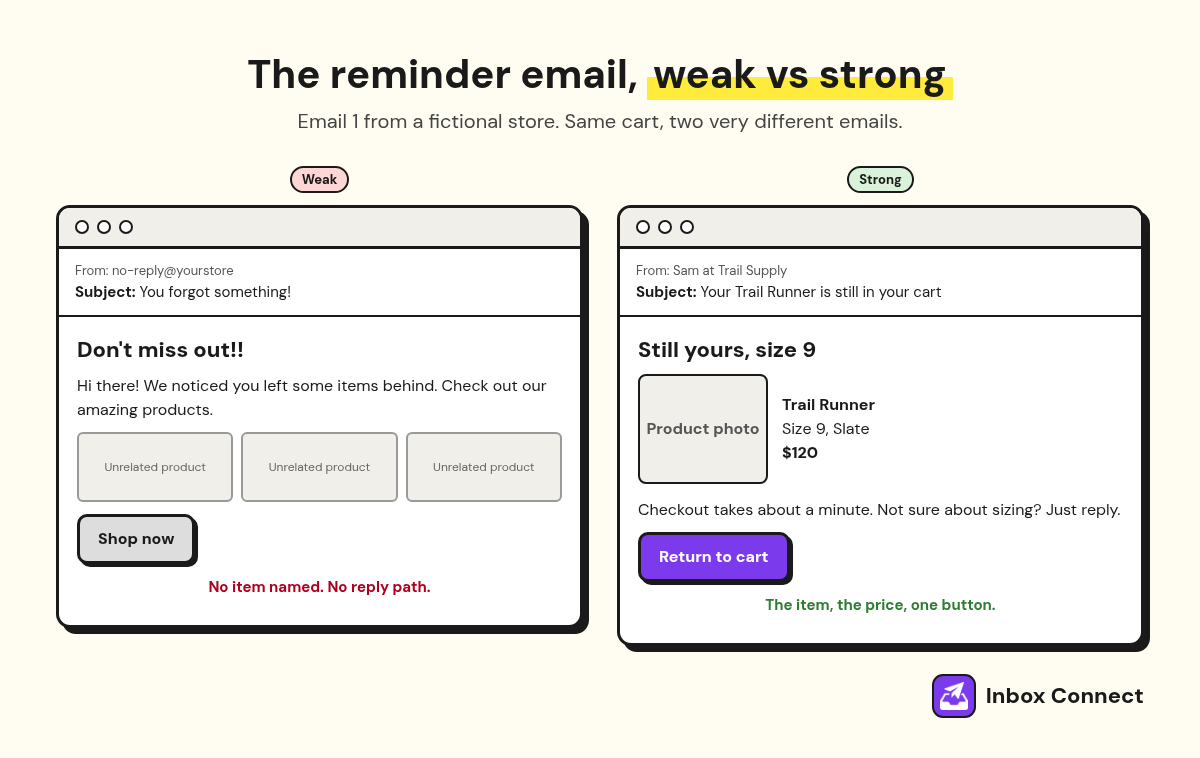
Here's what that looks like done badly and done well. The weak one: "Hi there! We noticed you left some items behind. Don't miss out on our amazing products!" It could be from any store, about any product, sent to anyone.
The strong one: "Your Trail Runner in size 9 is still in your cart. Checkout takes about a minute, and you can reply here if you have a sizing question." It names the thing, answers "is it still there?" and makes the next step feel small.
Email 2, the reassurance. This one answers the doubt that stopped them. In Baymard's checkout survey, once you set aside people who were just browsing, extra costs like shipping, tax and fees are the top reason shoppers leave, at 40%, followed by slow delivery at 20%.
So lead email 2 with your shipping cost, delivery time or returns promise, plus a review of the actual product if you have one. I also put a reply line in here, something like "Not sure about sizing? Hit reply." The questions that come back are a free list of fixes for your product pages.
Email 3, the reason to decide. Use urgency only when it's true, like genuinely low stock in their size. A fake countdown timer that resets every time they open the email fools nobody past the second go.
Email 4, the offer. Make it small, tie it to the item in the cart, and give it a real end date.
Email 5, the last call. Restate the offer, say it's the last email about this cart, and stop. Anyone still not buying belongs in your browse abandonment emails and regular campaigns, not a sixth reminder.
How do you build a Klaviyo abandoned cart flow?
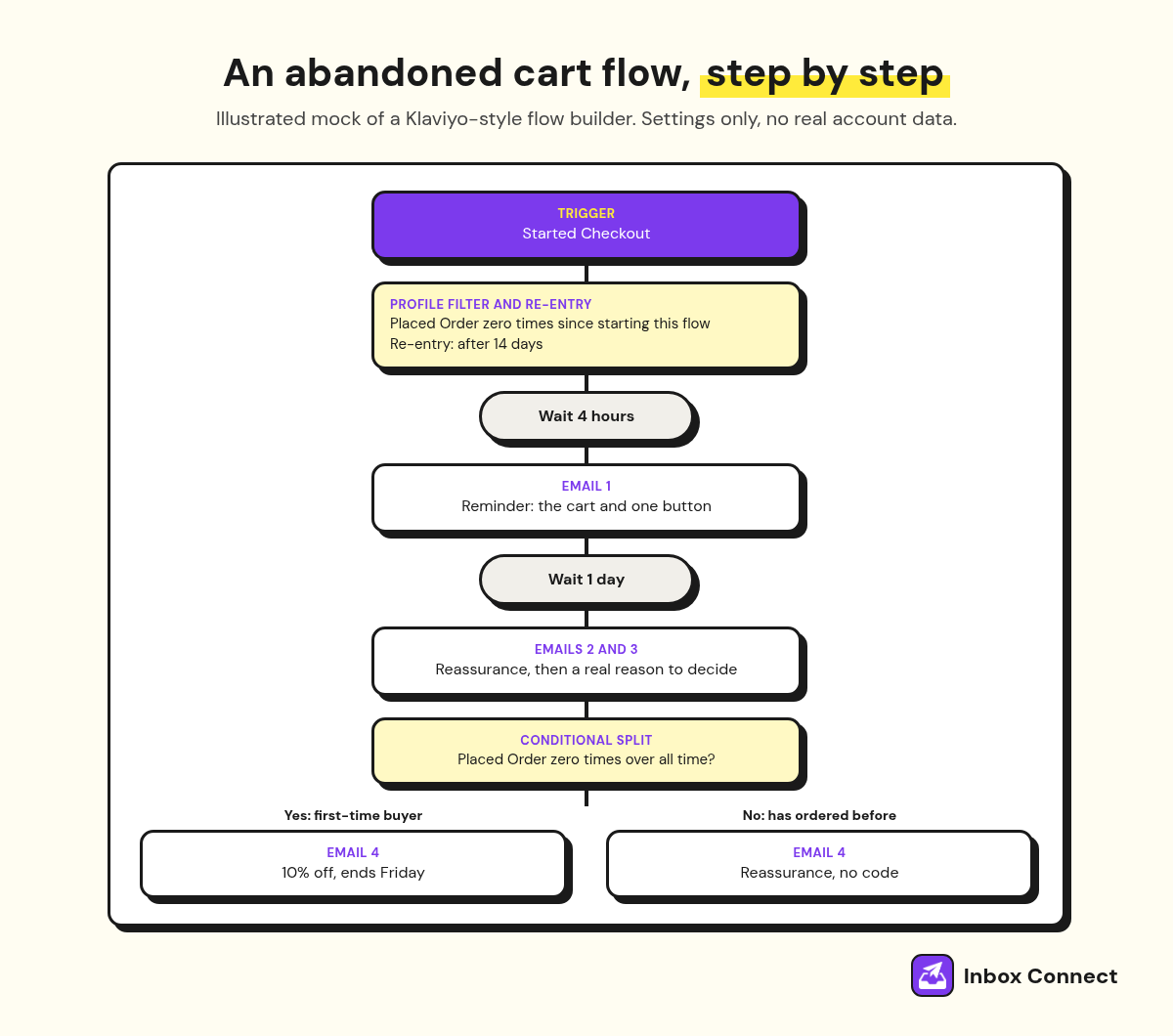
You build a Klaviyo abandoned cart flow by starting from the pre-built flow, triggering it on Started Checkout, adding the "Placed Order zero times since starting this flow" filter and setting the delays from the table above. It's an afternoon's work if your store is already syncing events.
The steps, in the order I do them:
- Turn off your platform's own reminder. Klaviyo tells you to switch off any abandoned cart emails your ecommerce platform sends, so shoppers don't get two reminders for one cart.
- Start from the flow library. The pre-built flow already has the dynamic product block and cart button, so save those as blocks before you restyle anything.
- Check the trigger. Started Checkout fires once a shopper enters contact details and moves past the first checkout step.
- Add the purchase exit. In profile filters, add "Placed Order zero times since starting this flow". Klaviyo checks it before every message, so buyers get skipped.
- Limit re-entry. Use the trigger's re-entry setting so a shopper who stalls every week doesn't get the full sequence every time. I start with 14 days.
- Set the delays. Four hours before email 1, then about a day between the next few. Klaviyo says never go under an hour and 15 minutes if your store syncs hourly.
- Review Smart Sending. Klaviyo's default email window is 16 hours, per its Smart Sending guide, and it skips anyone emailed inside that window. Decide per email whether you want that on.
- Test, then go live. Abandon a real checkout on your own store and read every email on your phone before you switch the flow to Live.
Klaviyo also recommends running a separate Added to Cart flow alongside it. On Shopify that needs the "Track behavioral events" setting switched on, plus the filter "Started Checkout zero times since starting this flow" so nobody gets both sets of emails.
When I built the abandoned checkout flow for an Australian dog food startup, it sat alongside welcome, browse abandonment, post-purchase and win-back, all mapped from scratch. Once buyers exit the cart flow, your post-purchase email sequence should pick them up.
After a week live, check how many people were skipped for failing profile filters. Klaviyo's guide says a big number there is normal, because it means buyers are being kept out.
When should a cart recovery email include a discount?
A cart recovery email should include a discount only late in the sequence, and only for shoppers who have never ordered from you. Klaviyo's guide advises against a coupon in the first email because it trains people to abandon carts to get one, and suggests holding it for the final email or for shoppers who've never purchased.
In Klaviyo, that's a conditional split before email 4. People with zero orders over all time get the offer, and repeat customers get more reassurance instead. The same split applies to email 5, so a returning customer never sees the code. My notes on Klaviyo segmentation cover how those conditions work.
The weak version of email 4 is "HUGE SALE!!! 25% off everything today only!" It ignores the cart completely and trains your whole list to wait for the next one.
The strong version is "Here's 10% off the Trail Runner for your first order. It's good until Friday, then it's gone." Same product block, same single button, and a deadline you actually honour.
If your margins can't carry a discount, offer free shipping instead. Extra costs top Baymard's list of reasons people leave, so free shipping often answers the real objection for less than a percentage off would cost you.
Abandoned cart benchmarks to judge your flow against
Judge your abandoned cart flow on conversion rate and revenue per email, because those are the numbers a reminder actually moves. Omnisend's 2026 benchmarks, drawn from its customers' 2025 sends, give you a fair outside reference.
| Metric | Cart vs campaign |
|---|---|
| Conversion rate | 1.72% vs 0.08% |
| Revenue per email | $3.59 vs $0.155 |
| Unsubscribe rate | 0.45% vs 0.20% |
In each row, the first figure is for abandoned cart emails and the second is for campaign emails, both from Omnisend's 2025 data. Revenue is per email sent.
The unsubscribe rate is more than double a campaign's, which sounds bad until you remember this is an email asking for money from someone who walked away. Omnisend also reports a 37.12% open rate for cart emails, but Apple's Mail Privacy Protection inflates opens, so I don't judge the flow on them at all.
Your own flow over time is the better benchmark. If email 3 or 5 converts close to zero for a couple of months, cut it.
My guide to ecommerce email marketing automation shows how this flow fits with welcome, browse and post-purchase, so you can see which gap to fill next.
Abandoned cart mistakes that cost you orders
The abandoned cart mistakes that cost the most orders are the five below, led by emailing people who already bought and discounting too early. Each one is a fix you can make in under an hour.
- No purchase exit. A shopper buys, then gets "still thinking about it?" the next morning. Add the Placed Order filter and confirm Placed Order events are actually syncing.
- A discount in email 1. You teach your best customers to stall at checkout and wait for a code, which is a bit like a shop handing out vouchers to anyone who puts their basket down.
- Generic copy. "Your cart is waiting" gives nobody a reason to care. Name the product, the size and the price.
- No mobile test. Most of these emails get read on a phone, so read every one on yours before it goes live.
- Ignoring deliverability. Cart emails still land in spam without authentication, so set up SPF, DKIM and DMARC.
The fixes that stop carts being abandoned in the first place live on your site, not in your inbox. My guide on how to reduce cart abandonment covers that side, from showing the total cost early to guest checkout.
Once a quarter, place a real order through the flow yourself. It's the only reliable way to catch a broken cart link or a coupon that expired in March.
FAQ
How many emails should an abandoned cart sequence have?
An abandoned cart sequence should have up to five emails over about a week. Klaviyo's research found two to three messages perform best, so start with three and add emails 4 and 5 only if they convert.
When should I send the first abandoned cart email?
Send the first abandoned cart email two to four hours after checkout stalls. Klaviyo's pre-built flow waits four hours, and it recommends at least an hour and 15 minutes if your store syncs hourly.
What's the difference between abandoned cart and abandoned checkout emails?
An abandoned cart email follows the Added to Cart event, while an abandoned checkout email follows Started Checkout, after the shopper has entered contact details. Klaviyo calls both abandoned cart flows and recommends running them separately.
How do I stop abandoned cart emails after someone buys?
Add the profile filter "Placed Order zero times since starting this flow" to the flow. Klaviyo checks it before every message, so anyone who orders is skipped for the rest of the flow.
Should abandoned cart emails include a discount?
Only late in the sequence and only for first-time buyers. Klaviyo advises against a coupon in the first email because it trains shoppers to abandon carts to get one.
Should I hire someone to set up my abandoned cart flow?
You don't need to if your store is syncing and you can follow the Klaviyo steps above. Hiring help makes sense when several flows need building at once, or the data isn't syncing and you can't tell why.
Final Thoughts
Open your abandoned cart flow today and check three settings: the Started Checkout trigger, the Placed Order filter and a first delay of a few hours. Then place a test order, abandon it, and read what turns up on your phone.
If you'd rather have the cart, browse and post-purchase flows built and tested for you, that's the work our Klaviyo agency does.
Russ