An email program audit is a timed, program-level review of list health, authentication, campaigns versus flows, and revenue leaks. In about 90 minutes you walk away with a scored pass-fail sheet and a short fix list, not a multi-week consulting deck.
I've run these 90-minute passes on Klaviyo and ecommerce accounts when the team felt busy but revenue was flat. This guide shows you exactly what I check in each block, what "pass" looks like, and when to stop and book outside help.
You will also see how a program audit differs from a flow-only deep dive, so you do not burn the hour rebuilding one abandoned-cart path while the list is rotting.
If you want the bigger funnel picture first, start with email marketing funnel. When you are ready for a second pair of eyes, book a free Email DDx audit.
In this article
- What an email program audit covers (vs a flow-only audit)
- The 90-minute agenda
- List health checks
- Deliverability and authentication
- Campaigns vs flows inventory (high level)
- Revenue leak map
- Scoring sheet / pass-fail table
- When to hire help / free Email DDx
- FAQ
- Final Thoughts
What an email program audit covers (vs a flow-only audit)
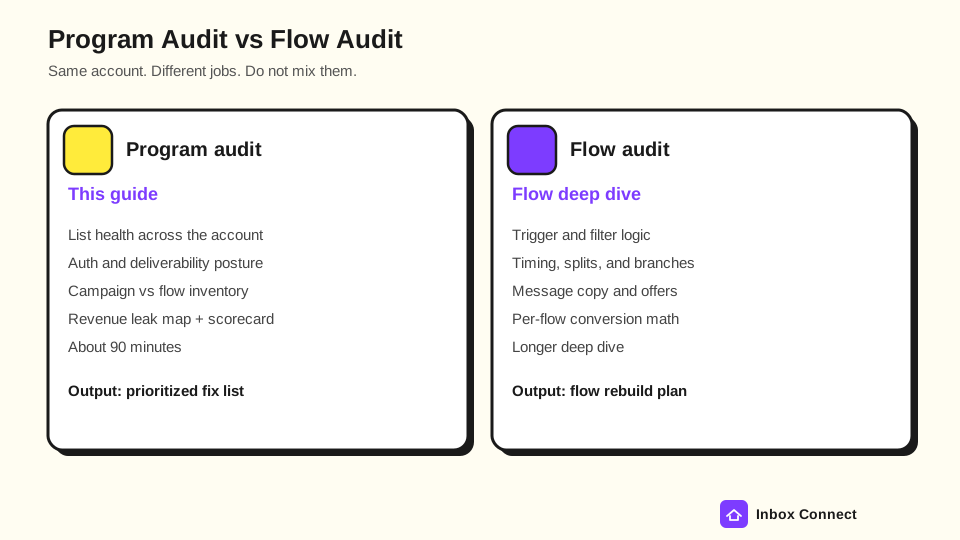
An email program audit covers the whole account at inventory and signal level. A flow-only audit goes message-by-message inside automations.
You need both over a quarter. You do not need both in the same 90 minutes.
A program audit answers questions like these:
- List Health: Are you paying to message people who bounce, complain, or never engage?
- Auth And Deliverability: Do SPF, DKIM, and DMARC actually work for the domains you send from?
- Campaigns Vs Flows: What is live, what is draft, and what is missing from the baseline stack?
- Revenue Leaks: Where does capture, lifecycle, campaign cadence, or measurement drop money?
A flow-only audit (the sibling piece on email automation audit) digs into triggers, filters, timing, splits, and per-flow conversion. Mention flows here only long enough to inventory them, then park deep rebuilds for that companion pass.
Pro tip: If someone asks you to "audit the welcome series" inside a program audit, write it on the scorecard as a Warn and move on. Scope creep is how 90 minutes becomes four hours.
The 90-minute agenda
The following timed blocks keep an email program audit honest. Stick to the clock even when a rabbit hole looks juicy.
| Block | Minutes | Focus | Done when |
|---|---|---|---|
| 1 | 0-10 | Scope and goals | ESP, list size, and "good" defined |
| 2 | 10-25 | List health | Bounce, complaint, engagement, suppressions noted |
| 3 | 25-40 | Auth and deliverability | SPF/DKIM/DMARC + Postmaster skim complete |
| 4 | 40-60 | Campaigns vs flows inventory | Live / draft / missing matrix filled |
| 5 | 60-80 | Revenue leak map | Top leaks named with owners |
| 6 | 80-90 | Score and next steps | Pass/Warn/Fail sheet + priority fixes |
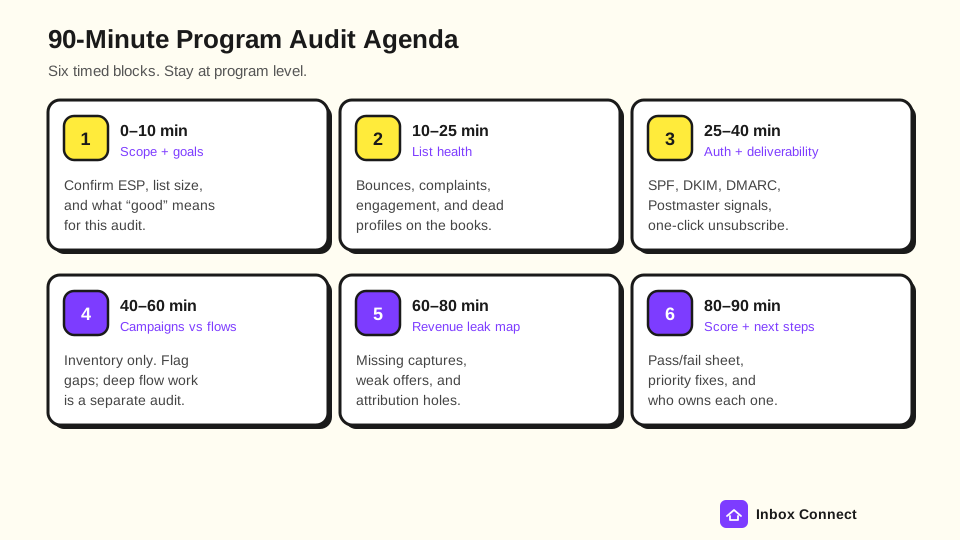
You can print a blank version of this agenda from the email program audit checklist if you want a worksheet beside the screen.
Ten minutes of scope saves you from auditing the wrong brand, the wrong ESP login, or last year's seasonal store.
List health checks
List health is the first place most email marketing audits find silent waste. You are checking whether the list you pay for still wants mail.
Open your ESP's profile, segment, and deliverability reports for the last 30 and 90 days. Write the numbers down; do not trust vibes.
Checks that belong in this block include the following:
- Hard Bounce Rate: Hard bounces should be rare and auto-suppressed. A rising trend usually means bad capture or a stale import.
- Spam Complaint Rate: Inbox providers care about this signal. Gmail's Email sender guidelines ask bulk senders to keep spam rates reported in Postmaster Tools below 0.3%.
- Engaged Core Size: Count profiles who opened or clicked in a window that matches your brand (often 30, 60, or 90 days). Compare that to total billable profiles.
- Suppression Hygiene: Confirm bounced, unsubscribed, and marked-as-spam profiles stay out of active campaigns.
- Source Quality: Spot imports, purchased lists, and unchecked checkout opt-ins. Those sources poison the rest of the program.
If engaged profiles are a thin slice of the bill, you have a list problem before you have a creative problem. Fixing subject lines will not rescue a list that stopped listening.
Pro tip: When I see billable profiles 3x larger than the engaged core, I stop the creative debate and put cleanup on the scorecard first. Subject-line tests on a dead list just burn reputation.
You can sanity-check how much inactive volume is costing you with the leak calculator. Use it as a prompt, not a courtroom exhibit.
Deliverability and authentication
Deliverability and authentication decide whether anyone sees the work you just inventoryed. In a program audit you verify posture, not every DNS dig forever.
Bulk senders to Gmail (more than 5,000 messages per day to Gmail accounts) need SPF and DKIM, a DMARC record (policy can be p=none), From-domain alignment, valid forward and reverse DNS, TLS, spam rates under 0.3% in Postmaster Tools, and one-click unsubscribe on marketing mail, per Google's Email sender guidelines (requirements in force since February 1, 2024; page checked October 28, 2026). Yahoo's Sender Best Practices track the same bulk-sender bar and ask you to honor unsubscribes within two days.
In fifteen minutes, check these items:
- SPF: Does the published record include every ESP and tool that sends for the domain?
- DKIM: Is DKIM signing on for the From domain, with a signing length of at least 1024 bits (2048 preferred)?
- DMARC: Is a DMARC record published, and do reports (
rua) go somewhere a human reads? - Alignment: Does the visible From domain align with SPF or DKIM so DMARC can pass?
- One-Click Unsubscribe: Do marketing sends include working List-Unsubscribe headers?
- Postmaster Skim: Open Google Postmaster Tools for domain reputation and spam-rate trends if you have access.
Use the free DMARC checker and deliverability checklist when you want a faster pass/fail without leaving the browser.
Fail anything that is missing or misaligned. Warn on p=none with no monitoring; Pass only when records exist, align, and spam signals look calm.
Pro tip: Auth Fail beats creative work every time. When I score auth Fail, I park subject-line tests until SPF, DKIM, and DMARC align.
Campaigns vs flows inventory (high level)
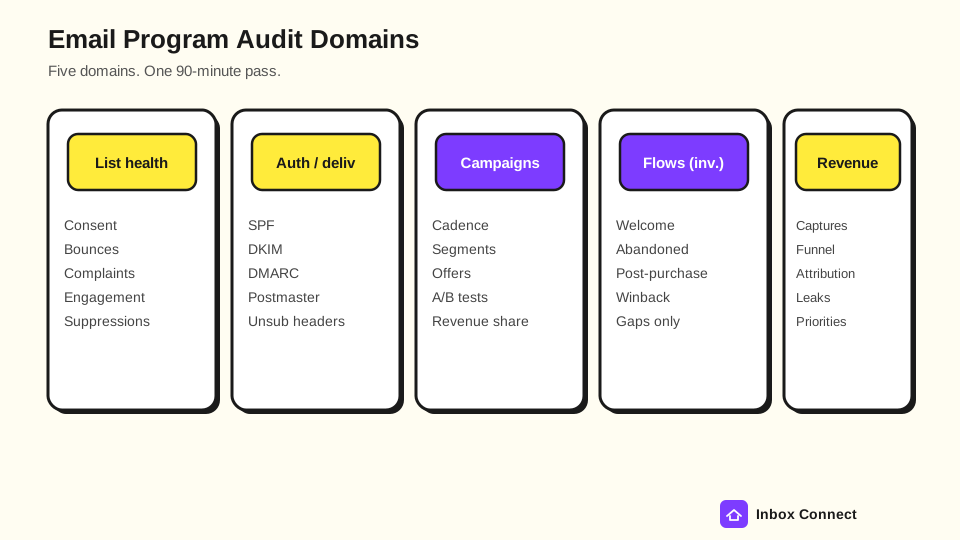
Campaigns versus flows is an inventory exercise in a program audit. You are counting what exists, not rewriting every email.
Pull a 90-day campaign calendar and a list of live flows (or automations, journeys, or sequences, depending on your ESP). Mark each row Live, Draft, or Missing.
A practical inventory matrix looks like this:
| Asset | Live | Draft | Missing | Note |
|---|---|---|---|---|
| Welcome / onboarding | ||||
| Abandoned cart / checkout | ||||
| Browse abandon | ||||
| Post-purchase / thank you | ||||
| Winback / sunset | ||||
| Weekly or biweekly campaign cadence | ||||
| Segmented offers (VIP, new, lapsed) | ||||
| Transactional / shipping (if in scope) |
You are looking for gaps and collisions. A brand with daily blasts and no abandoned cart is not "active"; it is noisy.
Campaign questions that still fit the clock:
- Cadence: Is there a planned rhythm, or only panic sends when inventory piles up?
- Segmentation: Are most sends going to "all subscribers," or to engaged and intent-based groups?
- Offer Rotation: Did the same 15% off become the only story for six months?
- Revenue Share: Roughly, do flows or campaigns carry more attributed revenue lately?
Flow questions that stay at inventory level:
- Core Paths Present: Welcome, abandoned, post-purchase, winback.
- Obvious Drafts: Flows sitting in draft while the trigger already fires in analytics.
- Obvious Overlaps: Two welcomes, or a campaign that duplicates a live flow's first message.
Anything deeper (filter logic, wait times, A/B structure, copy) belongs in the email automation audit. Write "needs flow deep dive" on the scorecard and protect the remaining minutes.
Revenue leak map
A revenue leak map turns the inventory into money language. You are naming where the program fails to capture, convert, or measure.
Walk four lanes in about twenty minutes:
- Capture: Forms, popups, checkout opt-in, and SMS consent. No list growth means no program.
- Lifecycle: Missing or thin automated paths that should fire on intent.
- Campaign: Blast-only habits, dead-list sends, and stale offers.
- Measure: Broken Placed Order (or purchase) tracking, missing UTMs, or attribution windows nobody trusts.
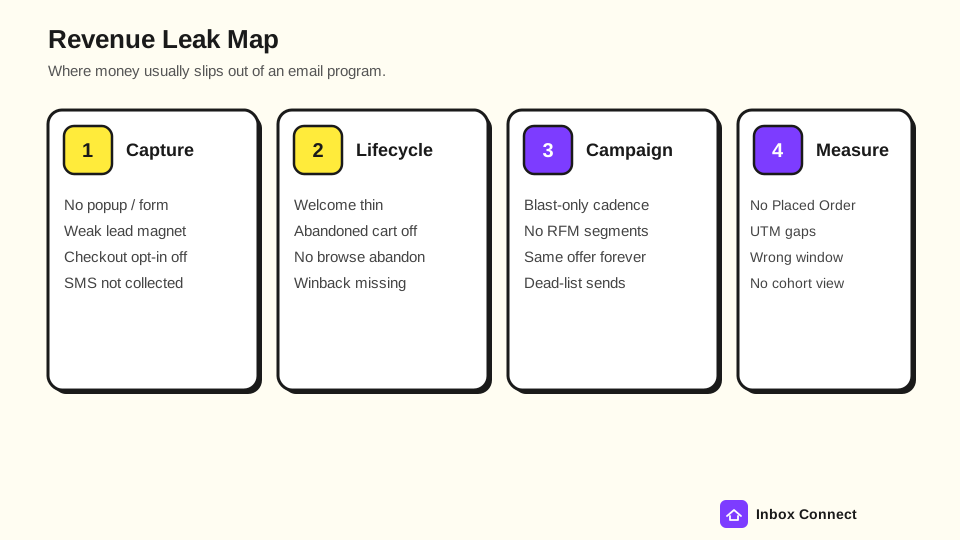
For each leak, write three fields only: what is broken, who owns the fix, and whether it is this week or this month. Skip invented ROI; a named leak with an owner beats a fantasy percentage.
If you want a quick dollar prompt for inactive profiles, open the leak calculator after you finish the map. Bring real list counts from your ESP so the estimate is not fiction.
Scoring sheet / pass-fail table
The scoring sheet is how you end the audit without a foggy "we should improve email" summary. Score each domain Pass, Warn, or Fail.
| Domain | Pass | Warn | Fail | Your score |
|---|---|---|---|---|
| List health | Engaged core healthy; bounces and complaints calm | Engaged core thinning; cleanup planned | High complaints or sending to dead volume | |
| Auth / deliverability | SPF + DKIM + DMARC aligned; Postmaster calm | Records exist but monitoring thin | Auth missing or misaligned | |
| Campaigns vs flows | Core flows live; cadence planned | Gaps noted with owners | Blast-only or major core flows missing | |
| Revenue leaks | Leaks mapped; top 3 owned | Leaks mapped; owners unclear | No measurement or capture foundation | |
| Overall | Ready to optimize | Fix Warns this month | Stop creative work; fix Fail rows first |
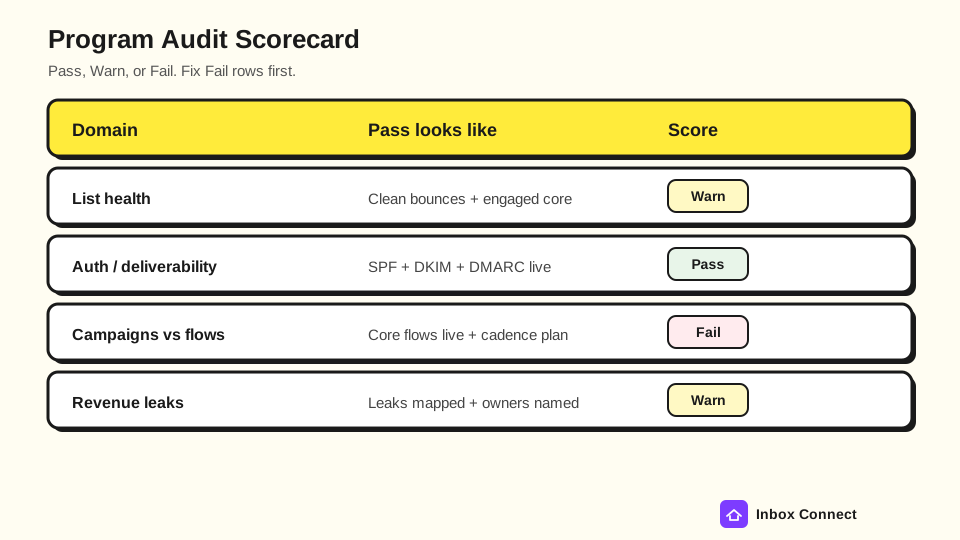
Fail rows win the next sprint. Warn rows get dates; Pass rows get left alone so you do not polish what already works.
A useful finish line is three written actions, each with an owner and a due date. "Improve deliverability" is not an action; "Publish DMARC with rua to ops@ by Friday" is.
Pro tip: Put a name next to every Fail and Warn before you close the laptop. When I leave owners blank, the same sheet comes back two weeks later with zero shipped fixes.
When to hire help / free Email DDx
Hire help when Fail rows sit outside your team's time or skill. Auth misalignment, chronic spam-rate trouble, and a missing lifecycle stack usually pay for outside hours faster than another internal meeting.
Stay in-house when Warns are small, owners are clear, and you already know how to ship the fixes. A clean 90-minute audit often is enough to unblock the next month of work.
Inbox Connect's free Email DDx audit is built for Klaviyo and ecommerce teams that want a structured diagnosis without buying a retainer first. Bring your scorecard; the call goes faster when Fail rows are already named.
Soft tools that pair with this article when you are still DIY:
FAQ
How long should an email program audit take?
A focused program-level email audit fits in about 90 minutes when you stay at inventory and signal level. Multi-day audits usually mean you mixed in a full flow rebuild or a creative overhaul.
What is the difference between an email program audit and an email marketing audit?
People use both phrases for the same job. Keep the scope on the scorecard so "email marketing audit" does not drift into brand creative and expand the work beyond list, auth, inventory, and revenue.
Do I need Google Postmaster Tools for this audit?
You should use Postmaster Tools when you send enough volume for it to show data. If you do not have access yet, still verify SPF, DKIM, DMARC, and one-click unsubscribe, then set up Postmaster as a follow-up task.
Should I pause campaigns during the audit?
Usually no. Pause only if spam complaints are already spiking or auth is clearly broken; most audits can run while the program keeps sending to engaged segments.
When should I run a flow-only audit instead?
Run a flow-only audit after the program scorecard shows lifecycle gaps or weak flow revenue, or when core flows are live but underperforming. Use the sibling email automation audit for that deep dive so this 90-minute pass stays honest.
Final Thoughts
You came here for a 90-minute email program audit, and you now have the agenda, the domain map, the leak lanes, and a pass-fail scorecard. Do the timed blocks once, write three owned fixes, and leave flow rebuilds for the automation companion.
Start with Fail rows on list health and authentication before you rewrite subject lines.
Russ