An email automation audit is a flows-only review of your live Klaviyo paths: triggers, filters, timing, message exits, and conversion. You walk away with a scored checklist and a short rebuild list, not a whole-program consulting deck.
I've opened dozens of Klaviyo accounts where the welcome looked fine and the cart was quietly mailing buyers. This guide stays inside automations on purpose so you can catch those fails without boiling the ocean.
For list health, domain auth, and account-wide revenue leaks, use the sibling email program audit first, then come back here.
If you want the bigger automation picture before you open Klaviyo, start with email marketing automation strategy. When you want a second pair of eyes on the scorecard, book a free Email DDx audit or talk to the Klaviyo agency team.
In this article
- Program audit vs automation audit
- Flow inventory checklist
- Welcome, cart, and post-purchase checks
- Klaviyo metrics to pull
- Timing and filters
- Common fail modes
- Pass/fail scorecard
- Next steps (Email DDx + Klaviyo agency)
- FAQ
- Final Thoughts
Program audit vs automation audit
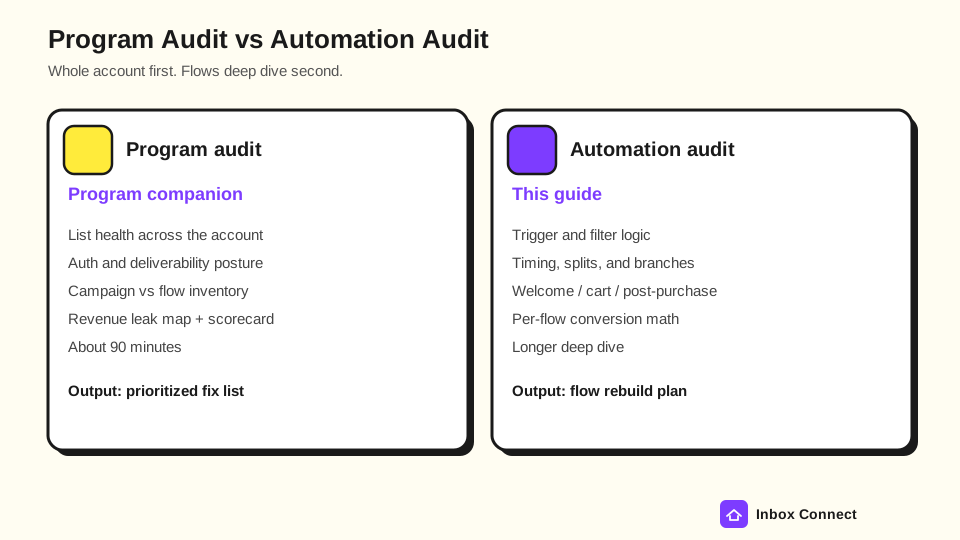
A program audit covers the whole account at inventory and signal level. An automation audit (this article) goes message-by-message inside flows.
You need both over a quarter. You do not need both in the same sitting.
Use a program audit when you are asking whether the list is healthy, whether SPF/DKIM/DMARC work, and whether core campaigns and flows even exist. Use an email automation audit when core flows are live (or should be) and you need to know why they underperform.
What stays out of this piece:
- List Health Deep Dive: Bounce, complaint, and engaged-core cleanup live in the program audit.
- Domain Auth Deep Dive: SPF, DKIM, DMARC, and Postmaster posture stay there too.
- Whole-Program Revenue Map: Capture forms and blast cadence belong to the program pass.
What this automation audit owns:
- Flow Inventory: Live, draft, or missing for every core path.
- Trigger And Filter Logic: Started Checkout, Placed Order, Viewed Product, and the exits that stop waste.
- Timing And Splits: Wait steps, quiet hours, and branch quality.
- Per-Flow Conversion: Received Email, Clicked Email, Opened Email, and Placed Order by message.
Pro tip: If someone asks you to "fix deliverability" inside a flow audit, write it as a Warn and keep going. Scope creep is how a half-day review becomes a week.
Flow inventory checklist
A flow inventory answers one question before you rewrite anything: which automations exist, and which ones are pretending to exist in draft?
Open Flows in Klaviyo and mark every core path Live, Draft, or Missing. Write the trigger metric next to each row so you catch wrong-event builds early.
Use this inventory matrix for an ecommerce email automation audit:
| Flow | Expected trigger | Live | Draft | Missing | Note |
|---|---|---|---|---|---|
| Welcome / onboarding | List (or confirmed opt-in) | ||||
| Abandoned cart | Started Checkout | ||||
| Browse abandon | Viewed Product | ||||
| Post-purchase / thank you | Placed Order | ||||
| Cross-sell / replenishment | Placed Order (+ trigger filter) | ||||
| Winback | Placed Order + long wait | ||||
| Sunset / engagement | Segment or engagement rules |
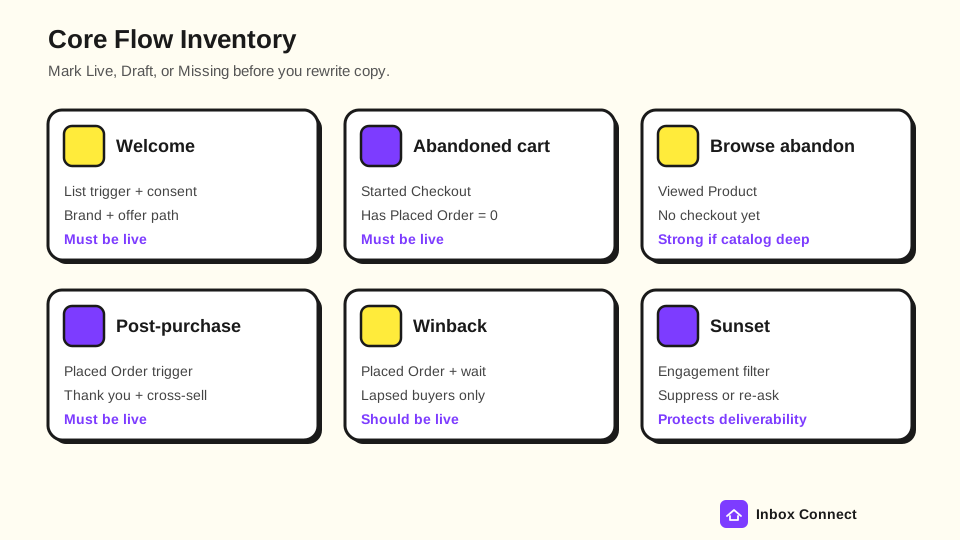
You are looking for gaps and collisions. Two live welcome flows on the same list is not "thorough." It is spammy.
Inventory rules that keep the audit honest:
- Core Paths First: Welcome, abandoned cart, and post-purchase must be Live before you argue about creative.
- Drafts Count As Gaps: A flow sitting in draft while Started Checkout already fires is Missing in practice.
- Name The Trigger: If the abandoned cart is on Viewed Product only, flag it before you touch subject lines.
- Note Overlaps: Campaign blasts that duplicate a flow's first message belong on the scorecard as Warn.
After the audit, keep abandoned cart email sequence and welcome email series open for sequence structure, not as a substitute for this checklist.
Welcome, cart, and post-purchase checks
Welcome, abandoned cart, and post-purchase usually carry most automated revenue. Audit them in that order unless cart is clearly broken.
Welcome flow checks
A welcome flow should start from a consented list (or confirmed opt-in), not from a random segment of everyone who ever browsed. Open the first message and confirm it explains who you are, what they signed up for, and what happens next.
Checks that belong here:
- Consent Gate: Does entry require email marketing consent, or can purchased and imported profiles sneak in?
- Immediate First Send: Does email 1 leave quickly enough that the signup still feels fresh?
- Brand Path: Do later messages teach the offer without dumping every discount on day one?
- Purchase Exit: Do buyers skip "first-order" incentives after they already placed an order?
- Duplicate Guard: Is there only one live welcome on the primary signup list?
If the welcome series is thin or missing, fix that before you invent a fifth winback email. New subscribers are the cheapest audience you already paid to capture.
Abandoned cart checks
An abandoned cart flow should trigger on Started Checkout, not on a vague "intent" segment. Klaviyo uses Started Checkout for abandoned cart and Placed Order for post-purchase (How to create a metric-triggered flow).
Then confirm the purchase exit: Has Placed Order zero times since starting this flow, so buyers do not keep getting abandon mail (Understanding flow triggers and filters).
Cart audit checklist:
- Trigger: Started Checkout (or Added to Cart only if that is how your store syncs and checkout is unreliable).
- Purchase Filter: Has Placed Order zero times since starting this flow.
- Cart Content: Dynamic line items and images still render for common products.
- Message Count: Usually 2 to 4 emails with rising urgency, not eight near-identical nudges.
- Offer Discipline: Discount appears late (or never) unless margin math already decided it.
- Skip Review: Open Recipient Activity and read who failed filters or already purchased.
If cart revenue is soft and the filter is missing, fix the filter before you rewrite the hero image. Sending abandon mail to people who already bought trains complaints.
Post-purchase checks
A post-purchase flow should trigger on Placed Order. Thank-you, shipping education, review ask, and cross-sell can share one flow or sit as sibling flows with trigger filters on category or value.
Checks that matter:
- Trigger: Placed Order is syncing for your store integration.
- Thank-You First: Message 1 confirms the order without a hard sell.
- Timing Vs Fulfillment: Review asks do not fire before the product can arrive.
- Cross-Sell Filters: Category A buyers do not get Category A again as the "recommendation."
- Re-Entry Rules: Repeat buyers are not trapped in first-purchase onboarding forever.
Pro tip: If Placed Order is missing or delayed, every post-purchase path and every cart exit is lying to you. Fix the metric before you debate copy.
Klaviyo metrics to pull
Pull real Klaviyo metric names so your notes match the UI. Do not invent labels like "checkout started" when the account shows Started Checkout.
Klaviyo's email metrics reference defines Received Email, Opened Email, Clicked Email, Bounced Email, and Marked Email as Spam. Open rates can include Apple Mail Privacy Protection prefetch opens, so treat opens as directional and lean on clicks for cleaner engagement.
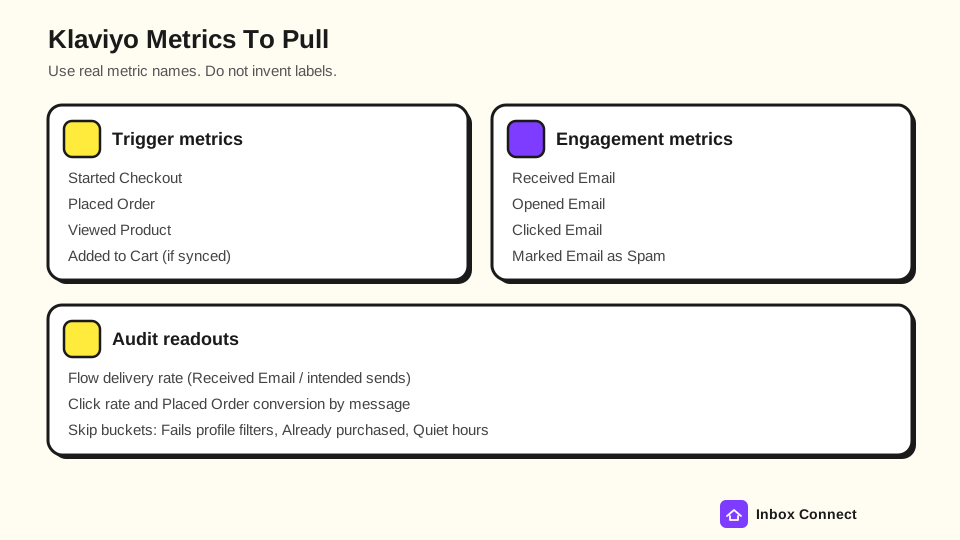
For each live flow, pull a 30-day and 90-day window and write the numbers down:
| Metric or readout | Where you look | Why it matters in a flow audit |
|---|---|---|
| Started Checkout | Analytics > Metrics + cart flow trigger | Confirms the abandon trigger is firing |
| Placed Order | Metrics + conversion tracking | Conversion and purchase exits |
| Viewed Product | Metrics + browse flow | Browse abandon volume |
| Received Email | Flow analytics / message | Delivery reality vs intended sends |
| Opened Email | Flow analytics / message | Directional attention (watch MPP inflation) |
| Clicked Email | Flow analytics / message | Stronger engagement signal than opens |
| Marked Email as Spam | Metrics + flow | Complaint risk on aggressive paths |
| Skip buckets | Recipient Activity > Other | Fails profile filters, already purchased, etc. |
Also confirm conversion tracking so Placed Order attributes to flow messages inside your windows (Understanding message conversion tracking). Blank conversion across every message is a measurement Fail before it is a creative Fail.
Opens still help for rough trend lines. They do not win an argument about whether the cart filter works.
Pro tip: When I audit skips, I open Recipient Activity before I touch creative. A fat "Fails profile filters" or "Already purchased" bucket usually explains soft revenue faster than a new hero image.
Timing and filters
Timing and filters decide whether a smart trigger becomes helpful mail or inbox noise. Audit waits and filters after inventory, not before.
Timing checks
Read every wait step out loud. If message 2 is 30 minutes after message 1 and message 3 is another 30 minutes, ask whether a human would call that a series or a pile-on.
Practical timing rules for this audit:
- Welcome: First email fast; later emails spaced in days, not minutes.
- Abandoned Cart: First reminder after a true abandon window (often 30 to 60 minutes, sometimes longer for high-consideration goods); later emails over 1 to 3 days.
- Browse Abandon: Longer delay than cart, and stop if Started Checkout or Placed Order happens.
- Post-Purchase: Align review and replenishment waits with real shipping and usage time.
- Quiet Hours / Smart Sending: Confirm you are not waking people at 3 a.m. local for a non-urgent nudge.
Watch sync lag too: Klaviyo notes some integrations sync on a delay, so an "immediate" send may wait on the metric (How to create a metric-triggered flow).
Filter checks
Separate trigger filters from profile filters the way Klaviyo does. Trigger filters look at event data at entry; profile filters look at the person and are checked again before actions (Understanding flow triggers and filters).
Filter audit prompts:
- Purchase Exits: Cart and browse paths stop after Placed Order.
- Consent: Marketing flows require email marketing consent.
- Engagement: Sunset and winback do not hammer never-openers forever.
- Additional Filters: Message-level filters still make sense after MPP (prefer clicks over opens when the split matters).
- Re-Entry: Confirm whether people should enter once, re-enter freely, or re-enter after a minimum period.
If half your intended audience sits in Skipped: Fails Profile Filters, the flow is not "underperforming creatively." It is misconfigured.
Common fail modes
Most weak automation programs fail for repeatable reasons. Scan this list before you blame the subject line.
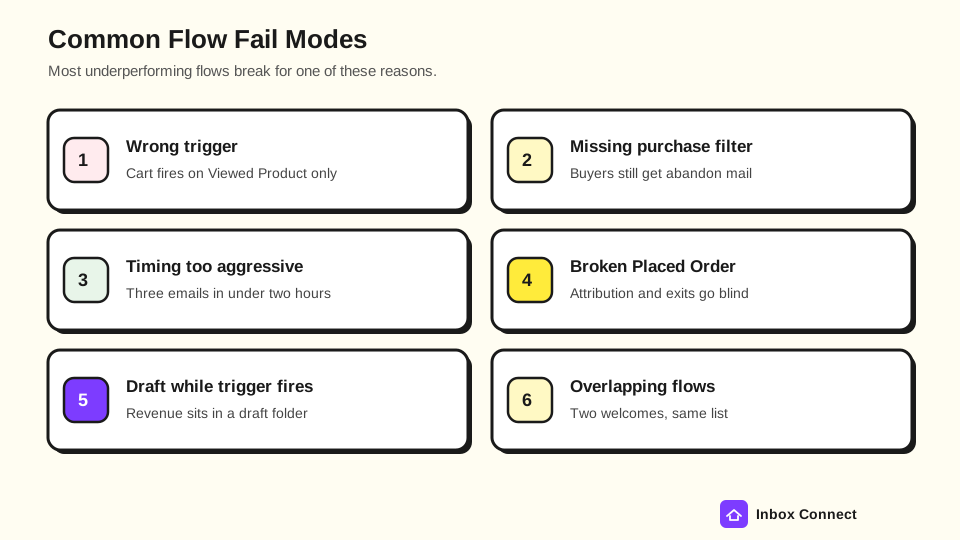
Common fail modes in a Klaviyo flow audit:
- Wrong Trigger: Abandoned cart on Viewed Product only, or post-purchase on a custom event that barely syncs.
- Missing Purchase Filter: Buyers keep getting abandon or browse mail after Placed Order.
- Draft While Trigger Fires: The metric is live; the flow is not.
- Timing Stack: Three emails inside two hours with the same offer.
- Broken Placed Order: Conversion and exits go blind, so every report looks mysterious.
- Overlapping Flows: Two welcomes, or a campaign that duplicates flow email 1 every Monday.
- Open-Only Branching: Splits that trust Opened Email alone after MPP inflation.
- Offer Addiction: Every path leads with 15% off until margin and brand feel interchangeable.
When you find a fail mode, write the flow name, owner, and due date. A named fail with an owner beats a fantasy lift percentage.
I've seen open-only branches look "smart" in the builder and still send the wrong path after MPP inflated opens. Prefer Clicked Email (or a purchase event) when the split decides money.
Pass/fail scorecard
The scorecard is how you end the automation audit without a foggy "we should improve flows" summary. Score each row Pass, Warn, or Fail.
| Area | Pass | Warn | Fail | Your score |
|---|---|---|---|---|
| Inventory | Welcome, cart, post-purchase Live | Gaps noted with owners | Core paths Missing or stuck in Draft | |
| Welcome | Consented list; clear path; purchase exit | Thin series or slow first send | No welcome, or duplicate welcomes | |
| Abandoned cart | Started Checkout + Placed Order exit | Timing or offer issues only | Wrong trigger or buyers still mailed | |
| Post-purchase | Placed Order live; thank-you + sensible waits | Thin cross-sell or review timing off | No post-purchase, or metric broken | |
| Timing / filters | Waits match intent; filters re-check correctly | Minor wait tweaks needed | Skip buckets dominate or filters missing | |
| Metrics / conversion | Received/Clicked/Placed Order readable | Opens muddy; clicks still usable | Conversion tracking broken | |
| Overall | Ready to optimize creative | Fix Warns this month | Stop new flows; fix Fail rows first |
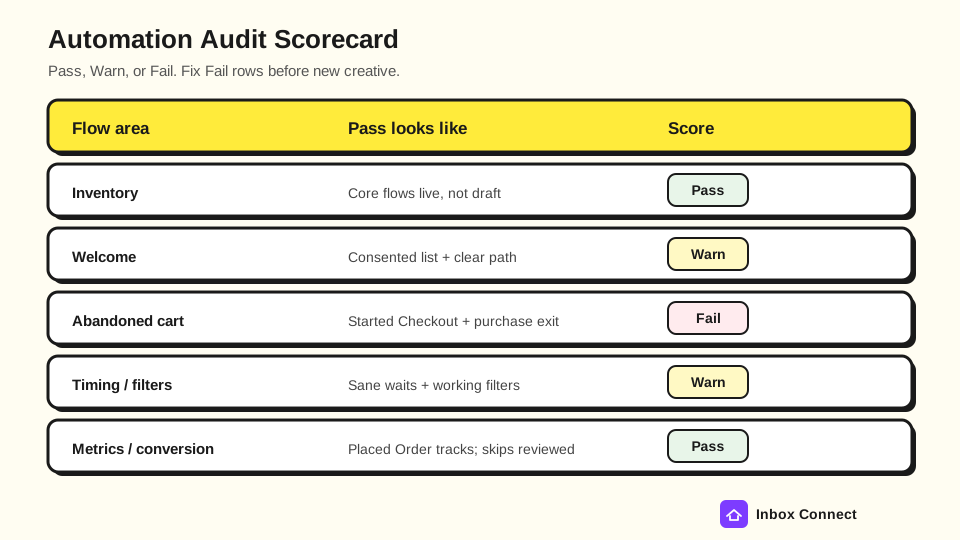
Fail rows win the next sprint. Warn rows get dates, and Pass rows get left alone so you do not polish what already works.
A useful finish line is three written actions, each with an owner and a due date. "Improve automation" is not an action; "Add Has Placed Order zero times since starting this flow to Abandoned Cart by Thursday" is.
Next steps (Email DDx + Klaviyo agency)
Stay in-house when Warns are small, owners are clear, and you already know how to ship the fixes. Hire help when Fail rows sit outside your team's time or skill, especially wrong triggers, broken Placed Order tracking, or a draft-only lifecycle stack.
Inbox Connect's free Email DDx audit is built for ecommerce teams that want a structured diagnosis before they buy ongoing help. Bring the scorecard so Fail rows are already named.
If you want hands-on Klaviyo build help, talk to the Klaviyo agency team with the same sheet. Strategy context lives on email marketing automation strategy; the program companion remains the email program audit.
FAQ
What is an email automation audit?
An email automation audit is a flows-only review of triggers, filters, timing, skips, and conversion on your automated paths. It is not a full list-and-auth program audit.
How is a Klaviyo flow audit different from a program audit?
A Klaviyo flow audit digs into individual automations. A program audit inventories the account (list health, auth, campaigns vs flows, revenue leaks) and should usually come first if those foundations are unknown.
Which Klaviyo metrics should I check first?
Start with Started Checkout, Placed Order, Received Email, Clicked Email, and Marked Email as Spam, plus the flow skip buckets. Add Opened Email with MPP caution, and Viewed Product if browse abandon is in scope.
How long should an automation audit take?
A focused flows audit for the core stack often fits in a half day when you stay on inventory, filters, timing, and metrics. Multi-day audits usually mean you mixed in a full creative rewrite.
Should I pause flows during the audit?
Usually no. Pause only if spam complaints are spiking on that path or a broken purchase filter is mailing buyers.
Do I need to rebuild every flow that scores Warn?
No. Fix Fail rows first, schedule Warns with owners, and leave Pass rows alone.
Final Thoughts
You came here for an email automation audit checklist, and you now have the inventory matrix, core-path checks, Klaviyo metrics, timing and filter prompts, fail modes, and a pass-fail scorecard. Do the flows pass once, write three owned fixes, and leave list-and-auth work on the program companion.
Start with Fail rows on wrong triggers, missing purchase filters, and broken Placed Order tracking before you rewrite subject lines.
Russ