The Google and Yahoo bulk sender requirements say that if you send around 5,000 or more emails a day to their users, you must authenticate with SPF, DKIM, and DMARC, offer one-click unsubscribe, honor opt-outs within two days, and keep your spam complaint rate under 0.3%. Both mailbox providers started enforcing these rules in February 2024, and Microsoft added matching rules for Outlook.com in May 2025.
If you just got a bounce code you have never seen, or your open rates fell off a cliff, you are probably not imagining it. Below you will see exactly who counts as a bulk sender, each rule in plain English, what Gmail, Yahoo, and Outlook do when you miss one, and a checklist you can work through this week.
Last checked: October 27, 2026. These rules change, so we date-stamp every update.
tl;dr
- Hit roughly 5,000 daily messages to Gmail once, and Google treats your domain as a bulk sender permanently.
- Pass SPF and DKIM, publish DMARC (p=none is the minimum), and align one of them with your From domain.
- Add RFC 8058 one-click unsubscribe headers to every marketing email and process opt-outs within 48 hours.
- Keep your user-reported spam rate under 0.1%, and never let it reach 0.3%.
- Outlook.com enforces the same authentication trio for senders above 5,000 a day, with rejections coded 550 5.7.515.
Who counts as a bulk sender?
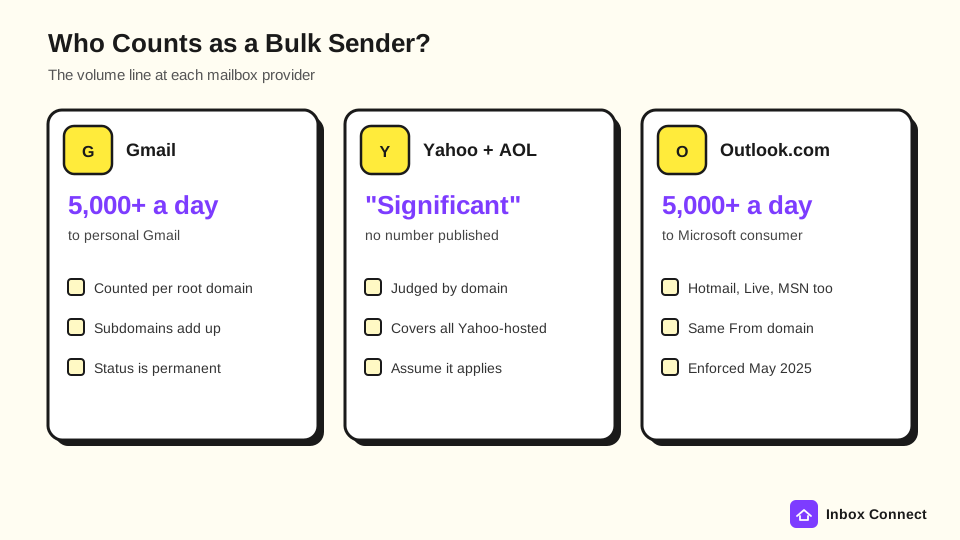
A bulk sender, in Google's definition, is anyone who sends close to 5,000 or more messages to personal Gmail accounts within 24 hours. Google counts every message sent from the same primary domain, so mail from yourbrand.com and news.yourbrand.com adds up to one total.
Here is the part most people miss. According to the Gmail sender guidelines FAQ, once you cross that line a single time, you are permanently classified as a bulk sender, and cutting volume later will not reset it.
Yahoo is vaguer on purpose. Its Sender Hub says a bulk sender sends "a significant volume of mail" and declines to name a number, and the rules cover every consumer domain Yahoo hosts, including AOL.
So what does that mean for you? If you run a newsletter or an ecommerce list of a few thousand people, assume the bulk rules apply, because Gmail addresses usually make up a big share of consumer lists (and a single Black Friday send can tip you over).
Personal Gmail addresses (@gmail.com and @googlemail.com) are what Google counts. Mail sent to Google Workspace business inboxes does not count toward the 5,000, but your Workspace account still has to follow the rules when it sends to personal Gmail users.
Google vs Yahoo vs Outlook requirements side by side
The three big mailbox providers ask for nearly the same things, which is good news. Fix your setup once and you pass all three.
The requirements for bulk senders at each provider include the following:
| Requirement | Gmail (5,000+/day) | Yahoo and AOL (bulk) | Outlook.com (5,000+/day) |
|---|---|---|---|
| SPF | Must pass | Must pass | Must pass |
| DKIM | Must pass, 1024-bit minimum | Must pass, 1024-bit minimum | Must pass |
| DMARC | Record required, p=none OK | Record required, p=none OK, must pass | Record required, p=none OK |
| From domain alignment | SPF or DKIM must align | SPF or DKIM must align | SPF or DKIM must align |
| One-click unsubscribe | Required for marketing (RFC 8058) | Required for marketing (RFC 8058 preferred) | Visible unsubscribe link recommended |
| Unsubscribe processing | Within 48 hours | Within 2 days | Clear, easy opt-out |
| Spam rate | Under 0.3%, aim under 0.1% | Under 0.3% | Not published |
| Valid forward and reverse DNS | Required | Required | Required |
| TLS and RFC 5322 format | Required | RFC 5321 and 5322 required | RFC compliance required |
Sources: Google email sender guidelines, Yahoo Sender Hub requirements, and Outlook.com postmaster policies, all checked October 27, 2026.
Notice that Outlook does not publish a spam rate ceiling or require one-click headers yet. Microsoft still lists a working unsubscribe link and list hygiene as expected practice, so treat them as required if you want consistent inbox placement.
How do you pass SPF, DKIM, and DMARC?
You pass all three by authenticating your sending platform on your own domain, then publishing a DMARC record that ties them together. In most cases that means three DNS records and about an hour of work.
Here is how each piece fits, and why the order matters:
- SPF Lists Who May Send for You: Your SPF record is a TXT record naming every service allowed to send from your domain, such as Klaviyo, Google Workspace, and your help desk. Leave one out and its mail can fail.
- DKIM Signs Each Message: DKIM adds a cryptographic signature that proves the email came from you and was not altered. Gmail and Yahoo require at least 1024 bits, and both recommend 2048.
- DMARC Tells Inboxes What to Do: DMARC is a TXT record at _dmarc.yourdomain.com that starts with v=DMARC1 and sets a policy. The minimum is p=none, which means "report, but do not block," and adding a rua address gets you daily reports.
- Alignment Connects Them to Your From Address: This is where most failures hide. The domain in your From header must match the domain that passed SPF or the domain that signed DKIM.
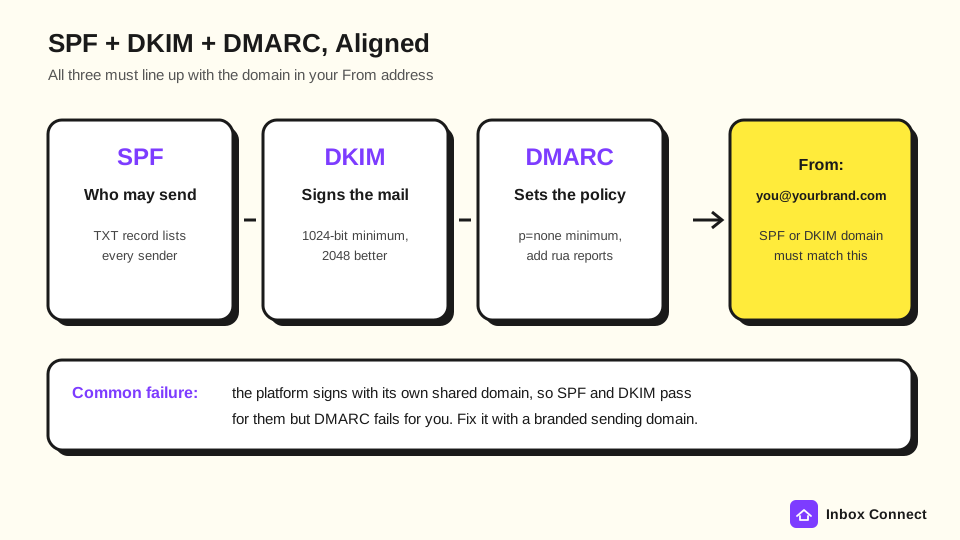
Why does alignment trip people up? Many platforms send on a shared domain by default, so SPF and DKIM pass for the platform but not for you.
The fix is to set up a branded sending domain (Klaviyo calls it a dedicated sending domain) so DKIM signs with your own domain. We walk through each record, with examples, in our guide to email authentication with SPF, DKIM, and DMARC.
Before you touch DNS, run your domain through the SPF checker, DKIM checker, and DMARC checker to see what already exists. If you have no DMARC record yet, the DMARC generator will write a safe p=none starter.
Pro tip: Keep p=none for two to four weeks while you read the reports. Once every legitimate sender passes, move to p=quarantine, which also makes you eligible for BIMI logos at Yahoo.
One-click unsubscribe and the two-day rule
Every marketing or subscribed email you send to Gmail and Yahoo must support one-click unsubscribe through email headers, not just a link in the footer. Transactional mail such as password resets and order confirmations is exempt.
To meet the RFC 8058 standard, each marketing message needs two headers:
- List-Unsubscribe: This header holds an HTTPS URL that removes the subscriber when it receives a POST request. A mailto address alone does not satisfy Google's requirement.
- List-Unsubscribe-Post: This header must read List-Unsubscribe=One-Click. It tells Gmail and Yahoo that a single click is enough, with no login and no landing page.
Google's FAQ is blunt about one thing. A one-click link that opens a landing page or preference center does not comply, although you can still keep a visible footer link that goes to your email preference center.
You might be thinking, "My platform handles this, right?" Most major platforms, including Klaviyo and Mailchimp, add these headers automatically, but custom SMTP setups, homegrown apps, and some CRMs do not, so check a raw message header to be sure.
Then there is the clock. Google asks you to honor unsubscribes within 48 hours, and Yahoo says requests not honored within 2 days fail the requirement.
That matters most for anyone who syncs lists between tools. If your CRM pushes contacts back into your sending platform once a week, people who opted out can get mailed again, and that is how complaint rates spike.
What spam rate do Gmail and Yahoo allow?
Gmail and Yahoo both set a hard ceiling of 0.3% user-reported spam, which is three complaints per 1,000 delivered emails. Google goes further and tells senders to stay below 0.1%, or one complaint per 1,000.
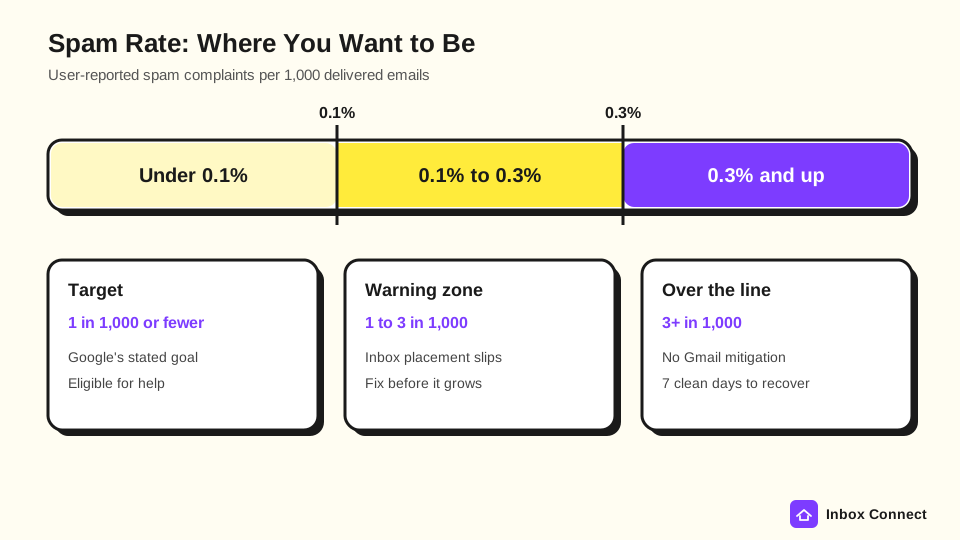
Here is how the numbers play out for a typical campaign:
| Delivered to Gmail | 0.1% target (max complaints) | 0.3% ceiling (max complaints) |
|---|---|---|
| 5,000 | 5 | 15 |
| 20,000 | 20 | 60 |
| 50,000 | 50 | 150 |
| 100,000 | 100 | 300 |
Google calculates the rate daily in Postmaster Tools. Since June 2024, bulk senders above 0.3% cannot get delivery help from Google, and they only become eligible again after staying under 0.3% for seven days in a row.
Yahoo measures complaints against mail delivered to the inbox, not total sends. To see your Yahoo numbers, enroll your DKIM domain in Yahoo's Complaint Feedback Loop through the Sender Hub (most platforms enroll you automatically, but confirm it).
What pushes complaint rates up? The usual causes are mailing people who never clearly opted in, sending far more often than you promised, and hiding the unsubscribe link.
The fastest fixes are a double opt-in for new signups and a sunset policy that stops mailing people who have not engaged in months. Regular email list cleaning handles the rest.
The enforcement timeline from 2024 to 2026
Enforcement has rolled out in stages since Google and Yahoo announced the rules in October 2023. Each step made the penalties a little sharper.
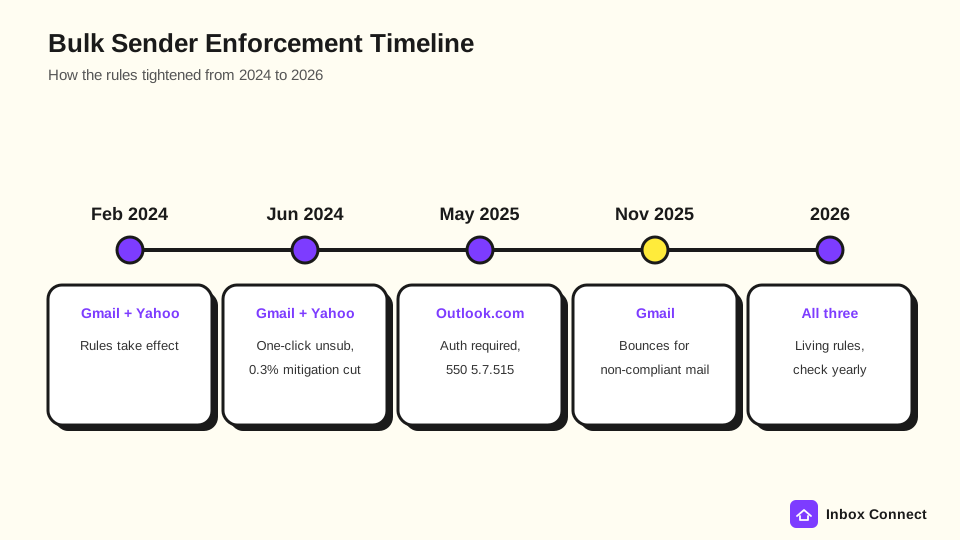
| Date | Who | What changed |
|---|---|---|
| February 2024 | Gmail and Yahoo | Bulk sender rules take effect, with gradual enforcement through the first half of the year |
| June 1, 2024 | Gmail | Deadline for one-click unsubscribe on all promotional mail |
| June 2024 | Gmail and Yahoo | Gmail ends delivery mitigation for senders over 0.3% spam; Yahoo begins enforcing List-Unsubscribe |
| May 5, 2025 | Outlook.com | SPF, DKIM, and DMARC required above 5,000 daily messages, with failures rejected as 550 5.7.515 |
| November 2025 | Gmail | Enforcement ramps up with temporary and permanent rejections for non-compliant traffic |
The November 2025 change is the one many senders felt. Before then, Gmail mostly slowed down or spam-foldered non-compliant mail, and now it bounces it outright.
Microsoft's path was similar. Its Outlook.com policies say high-volume domains that fail authentication go to junk first, then get rejected if the problem stays unresolved.
What happens if you miss a requirement?
If you miss a requirement, your mail gets slowed, sent to spam, or bounced, depending on which rule you broke. Authentication and formatting failures hit hardest because Gmail now rejects those messages.
Gmail's error codes tell you exactly what went wrong. These are the bounce codes you are most likely to see:
- 4.7.27 or 5.7.27: SPF did not pass, so check that your sending platform is in your SPF record.
- 4.7.30 or 5.7.30: DKIM did not pass, which usually means the platform is not signing with your domain yet.
- 4.7.31: Your domain has no DMARC record, or the record has no policy tag.
- 4.7.32: Your From domain does not align with the SPF or DKIM domain.
- 4.7.23 or 5.7.25: Your sending IP has no valid PTR record, which is more common on self-hosted servers than on major platforms.
- 550 5.7.515 at Outlook.com: Your domain does not meet Microsoft's authentication level for high-volume senders.
Codes starting with 4 are temporary, so Gmail rate limits you and your platform retries. Codes starting with 5 are permanent, and the message is gone.
The softer penalty is less obvious but still costly. Missing DMARC, one-click unsubscribe, or the spam threshold makes you ineligible for mitigation, so Google will not help you if deliverability tanks, and your sender reputation keeps sliding while you guess at the cause.
Your bulk sender compliance checklist
Use this checklist to confirm you meet the Google and Yahoo bulk sender requirements, in the order we would tackle them. Most teams can finish it in an afternoon.
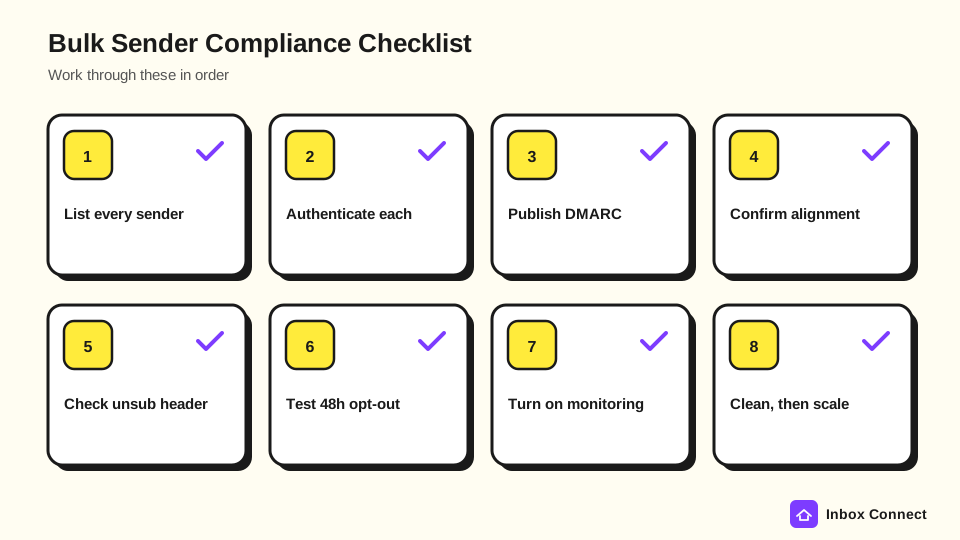
- List Every Sending Service: Write down each tool that sends from your domain, including marketing, transactional, help desk, invoicing, and CRM. Forgotten senders are the top cause of SPF and DKIM failures.
- Authenticate Each One: Add each service to SPF and turn on DKIM signing with your own domain, using a 2048-bit signature where the platform allows it.
- Publish DMARC: Start with p=none and a rua reporting address, then read the reports for two to four weeks.
- Confirm Alignment: Send a test to a Gmail account, open "Show original," and check that SPF, DKIM, and DMARC all say PASS for your domain.
- Check Unsubscribe Headers: In that same raw message, look for List-Unsubscribe and List-Unsubscribe-Post. If either is missing, fix it in your platform settings.
- Test the Opt-Out Clock: Unsubscribe a test address and confirm it is suppressed everywhere within 48 hours, including any synced CRM.
- Set Up Monitoring: Verify your domain in Google Postmaster Tools, which now includes a compliance status dashboard, and enroll in Yahoo's Complaint Feedback Loop.
- Clean Before You Scale: Remove hard bounces and long-term inactives before big sends, and ramp volume gradually instead of doubling it overnight.
If you would rather tick boxes on screen, our deliverability checklist covers the same ground with links to each fix.
Where to start this week
You now know who the bulk sender rules cover, what each one asks for, and what happens when you miss one. Our recommendation is simple: fix authentication and alignment first, because that is what Gmail now bounces, then confirm one-click unsubscribe, then watch your spam rate weekly.
Start with a free deliverability score for your domain. It checks SPF, DKIM, DMARC, MX, and blocklists in one lookup and returns a 0 to 100 score, so you will know in minutes which line of the checklist to tackle first.
Want the bigger picture beyond compliance? Our guide on how to improve email deliverability and avoid spam covers reputation, engagement, and content once the technical basics are solid.
FAQ
Do the bulk sender rules apply if I send fewer than 5,000 emails a day?
Partly. Every sender to Gmail still needs SPF or DKIM, valid DNS, TLS, and a spam rate under 0.3%, while DMARC, alignment, and one-click unsubscribe are formally required only for bulk senders. We recommend meeting the full bulk standard anyway, since it costs little and protects you as you grow.
Does p=none really satisfy the DMARC requirement?
Yes. Google, Yahoo, and Microsoft all accept a DMARC policy of p=none for bulk senders. It is only a starting point, though, because p=none does not stop anyone from spoofing your domain.
Is an unsubscribe link in my footer enough?
No. Gmail and Yahoo both require List-Unsubscribe headers for marketing mail, and Google says a body link alone does not meet the rule. You can keep the footer link pointing to a preference page as long as the headers are in place.
Do transactional emails need one-click unsubscribe?
No. Order confirmations, password resets, and similar transactional messages are exempt from the one-click rule. Keep promotions out of those emails, though, because Google says mixing content types hurts delivery.
How do I check my Gmail spam rate?
Verify your sending domain in Google Postmaster Tools, which reports your user-reported spam rate daily once you send enough volume. Your email platform's complaint numbers are a rough guide but often miss Gmail complaints.
Do these rules apply to AOL and Hotmail too?
Yes. Yahoo's requirements cover every consumer domain it hosts, including AOL, and Microsoft's 2025 rules cover Outlook.com, Hotmail, Live.com, and MSN addresses.