You can segment your list in Klaviyo by going to Audience > Lists & segments, clicking Create > Segment, and stacking conditions like Placed Order or Opened Email with AND and OR. Each segment takes a few minutes to build, and it keeps itself up to date after that.
Get one condition wrong, though, and your "targeted" campaign reaches people who never subscribed. Klaviyo's own guide to segments warns that segments pull from every profile in your account, opted in or not.
The upside is real when you get it right. In Klaviyo's segmentation benchmark of 2.62 billion emails sent in late 2017, highly segmented campaigns earned $0.19 per recipient against $0.06 for unsegmented sends.
I build and run Klaviyo accounts for ecommerce brands at Inbox Connect, and the 12 segments below are the ones I'd set up first in your account (most of them take one or two conditions).
Below, I'll show you how segments differ from lists and flow filters, the build steps, how AND and OR behave, 12 segments worth building, and how to tell if they're working. By the end, you'll have segments you can send to this week, so more of each campaign reaches people who buy.
Open Klaviyo, and let's start with what a segment actually is.
In this article
- Segments vs lists vs flow filters in Klaviyo
- How do you create a segment in Klaviyo?
- How do AND and OR work in Klaviyo segments?
- 12 Klaviyo segments to build first
- How do you know if your Klaviyo segments are working?
- FAQ
- Final Thoughts
Segments vs Lists vs Flow Filters in Klaviyo
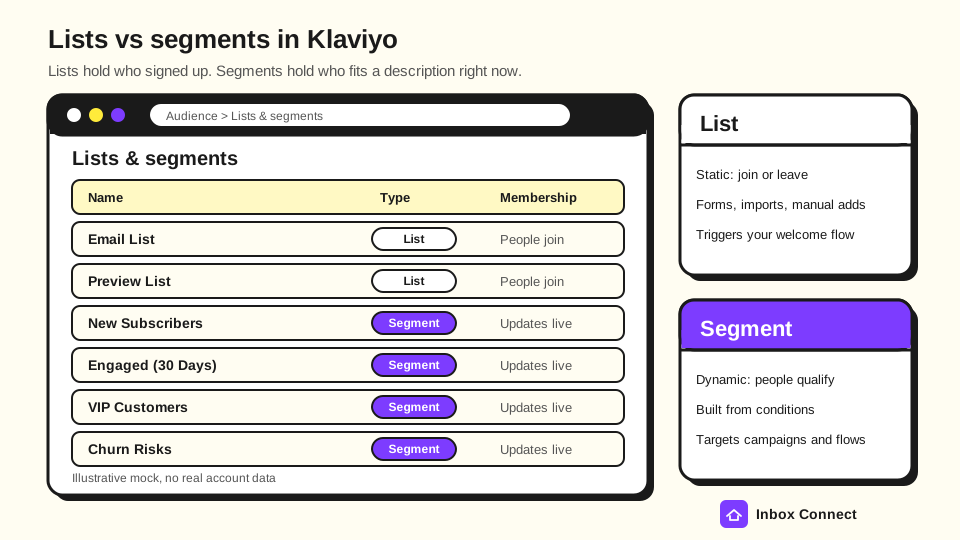
A Klaviyo segment is a dynamic group of profiles defined by conditions, while a list is a static group that people join through a form, an import, or a manual add. Flow filters are a third thing: they decide whether one person gets one message inside a flow.
That split matters because each tool answers a different question. A list answers "who signed up?", a segment answers "who fits this description right now?", and a flow filter answers "should this person get this email?"
| List | Segment | Flow filter | |
|---|---|---|---|
| How people get in | Sign-up form, checkout opt-in, import, or manual add | They meet the conditions you set | They're already in the flow |
| How it updates | Only when someone joins, is removed, or unsubscribes | Close to real time; time-based conditions refresh every 24 hours | Checked at entry and before each message |
| Can you add someone by hand? | Yes | No | No |
| Means consent? | Not on its own | Only if you add a consent condition | Follows the flow's audience |
| Best for | Collecting subscribers and triggering a welcome flow | Targeting campaigns, triggering flows, exclusions, analysis | Stopping the wrong message, like a cart reminder after purchase |
Klaviyo's article on segments vs lists recommends one main list per channel that holds everyone who has consented. You then build segments on top of that list, instead of creating a new list for every audience you want to reach.
Flow filters are easy to mix up with segments, because both use the same kinds of conditions. Klaviyo's flow triggers and filters guide explains that a profile filter is checked when someone enters a flow and again before each email, and failing it skips that message without removing the person from the flow.
Weak vs strong: building a VIP audience
Weak: Export your best customers from Shopify every quarter and import them into a "VIPs" list. It's accurate for about a day, and then new big spenders are missing while lapsed ones stay in.
Strong: Use a VIP Customers segment with What someone has done (or not done) > Placed Order is greater than 5 over all time. It adds every new qualifier on its own, and you never touch a CSV again.
Pro tip: If the audience depends on something people do, make it a segment. If it depends on something people asked for, like a newsletter they ticked at checkout, make it a list.
How Do You Create a Segment in Klaviyo?
To create a segment in Klaviyo, go to Audience > Lists & segments, click Create, choose Segment, name it, add your conditions, and click Create segment. Here's each step with the choices that trip people up.
- Open Lists & Segments: In the left menu, go to Audience > Lists & segments.
- Start a Segment: Click Create in the upper right corner and choose Segment.
- Name It for What It Means: "Engaged 60d, bought once" tells your future self more than "Segment 14". Good names also stop two people from building the same audience twice.
- Pick a Condition Type: Klaviyo offers seven condition types, listed in the table below. Most store segments use the first three.
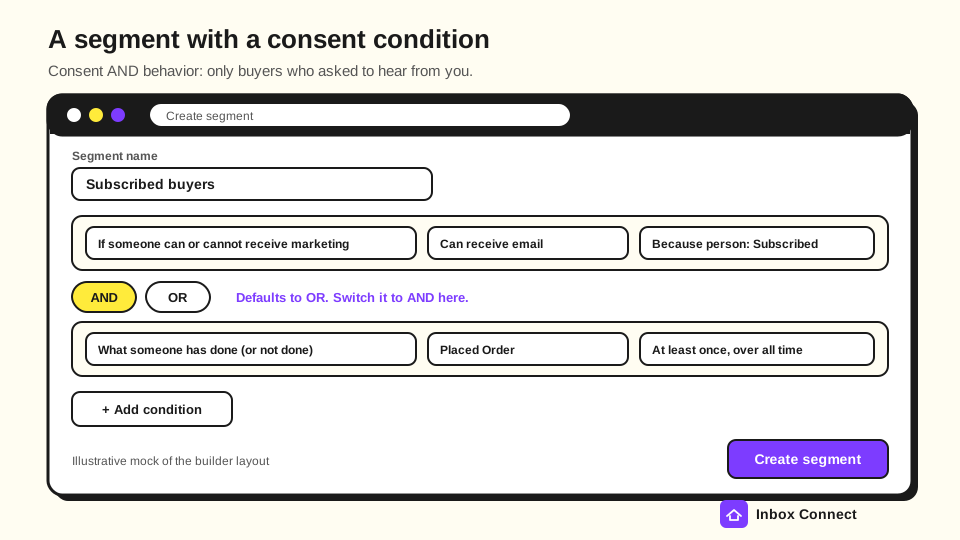
- Add Conditions and Set the Connector: Click Add condition for each rule, then choose AND or OR between them. Klaviyo sets the connector to OR by default, so check every one before you save.
- Save and Let It Populate: Click Create segment and give it time to fill before you schedule a campaign. A manual refresh can take up to 15 minutes, according to Klaviyo's segment update guide.
Klaviyo's segment conditions reference lists the condition types you can pick from. This is how I'd use each one in a store account.
| Condition type | What it checks | Example |
|---|---|---|
| What someone has done (or not done) | Any tracked event, such as Placed Order, Viewed Product, Active on Site, Opened Email, or Clicked Email | Placed Order at least once in the last 30 days |
| Properties about someone | Profile data like City, Country, First Active, Initial Source, or your own custom properties | Initial Source contains "quiz" |
| If someone can or cannot receive marketing | Consent for email, SMS, or push | Can receive email marketing, because person Subscribed |
| If someone is in or not in a list | List membership | Is in Email List |
| Predictive analytics about someone | Predicted CLV, churn risk, and expected date of next order | Expected date of next order is in the next 14 days |
| Someone's proximity to a location | Distance from a postal code | Within 30 miles of your pop-up shop |
| If someone is or is not within the EU (GDPR) | EU location | Exclude EU profiles without GDPR consent |
Weak vs strong: the consent condition
Weak: Placed Order at least once over all time, sent as a campaign to "all buyers". Klaviyo pulls in every buyer it knows about, including people who checked out without opting in to marketing.
Strong: If someone can or cannot receive marketing > can receive email marketing > because person Subscribed, AND Placed Order at least once over all time. Now the segment only holds buyers who asked to hear from you.
Pro tip: Klaviyo's segment builder can draft conditions from a sentence with Define with AI, on paid accounts hosted in the US. It's a fast start, but read every condition it writes, because one wrong connector changes the whole audience.
How Do AND and OR Work in Klaviyo Segments?
AND makes a segment stricter, because every condition joined by AND must be true. OR makes it broader, because a profile only has to meet one of the conditions joined by OR.
When you mix them, Klaviyo's AND vs OR reference says conditions joined by OR form a group, and a profile must meet every group joined by AND. In plain terms, read each OR group as if it sits inside brackets.
Here's the "nearly there" segment Klaviyo uses as its example, written the way I'd build it:
- Consent: If someone can or cannot receive marketing > can receive email marketing > because person Subscribed. AND
- Engagement Group: Opened Email at least once in the last 30 days, with Apple Privacy Open equals false. OR Clicked Email at least once in the last 30 days. AND
- Not a Buyer Yet: Placed Order zero times over all time.
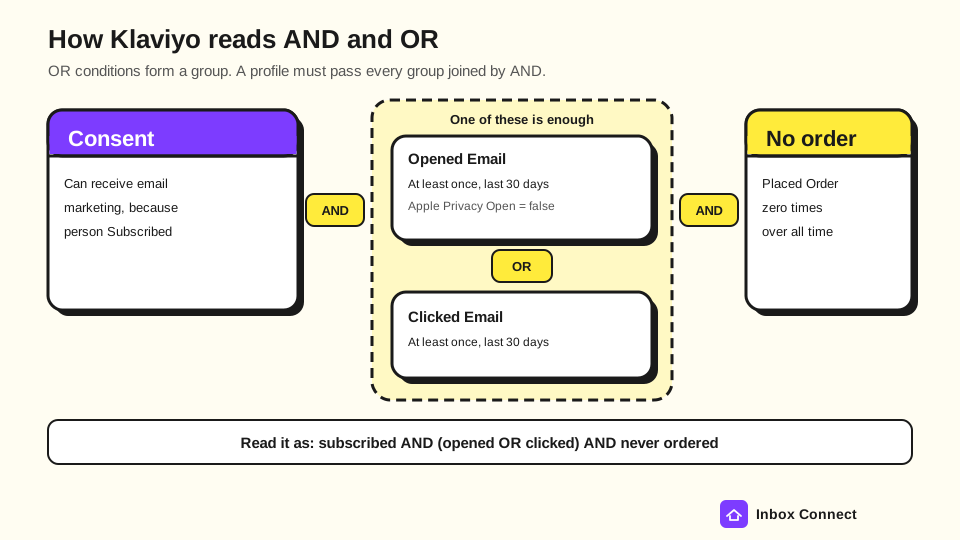
That Apple Privacy Open filter comes from Klaviyo's espresso shot segment guide, and it strips out opens that Apple Mail Privacy Protection generates automatically. Without it, plenty of people who never looked at your email still count as engaged, which my Apple Mail Privacy Protection guide explains in more detail.
Weak vs strong: excluding two countries
Weak: Country doesn't equal United States OR Country doesn't equal Canada. A Canadian passes the first condition, an American passes the second, and the segment ends up excluding nobody.
Strong: Country doesn't equal United States AND Country doesn't equal Canada. Every negative condition must hold, so both countries drop out, which is exactly the fix Klaviyo's reference shows.
Pro tip: Before you click Create segment, read the definition out loud with the word "and" or "or" between every line and brackets around each OR group. If the sentence sounds wrong to you, the audience is wrong too.
12 Klaviyo Segments to Build First
These are the 12 Klaviyo segments I'd build first in an ecommerce account. Eight already exist as defaults once you finish setup and connect a store like Shopify, BigCommerce, WooCommerce, or Magento, so open Lists & segments and check before building duplicates.
Every segment below assumes your consent condition from the previous section. The default definitions come from Klaviyo's default lists and segments reference; the custom thresholds are starting points for you to adjust.
| # | Segment | Conditions (Klaviyo names) | Use it for |
|---|---|---|---|
| 1 | Engaged (30 Days) | Default: opened or clicked an email in the last 30 days, or joined Email List in the last 15 days | Your everyday campaign audience |
| 2 | Engaged (90 Days) | Default: opened or clicked in the last 90 days, or joined in the last 45 days | Bigger promotions and launches |
| 3 | New Subscribers | Default: added to Email List in the last 2 weeks | Excluding people from campaigns while the welcome series runs |
| 4 | Unengaged | Custom: Received Email at least 10 times in the last 90 days AND zero opens (Apple Privacy Open equals false) AND zero clicks in the last 90 days | Excluding from campaigns and feeding a sunset flow |
| 5 | Potential Purchasers | Default: viewed a product, clicked an email, or was active on site in the last 30 days, and never placed an order | A first-order nudge |
| 6 | First-Time Buyers | Custom: Placed Order equals 1 over all time | Earning the second order |
| 7 | Repeat Buyers | Default: Placed Order more than 1 time over all time | New arrivals and brand content |
| 8 | VIP Customers | Default: Placed Order more than 5 times over all time | Early access and thank-you offers |
| 9 | Win-Back Opportunities | Default: at least 1 order over all time, none in the last 180 days | Win-back campaigns and flows |
| 10 | Churn Risks | Default: at least 1 order, none in the last 180 days, received at least 2 emails in the last 90 days and opened none | A last re-engagement attempt, then suppression |
| 11 | Hot Browsers | Custom: Viewed Product at least 2 times in the last 7 days AND Placed Order zero times in the last 7 days | Product-led campaigns |
| 12 | Due to Reorder | Custom: Predictive analytics about someone > Expected date of next order is in the next 14 days | Replenishment reminders |
Engagement segments: who you send to
Segments 1 to 4 decide your campaign audience, so build these before anything else. Send most campaigns to Engaged (30 Days), use Engaged (90 Days) for bigger moments, and exclude New Subscribers and Unengaged from both.
The Unengaged segment is the one I'd never skip, because it protects every other send. Gmail's Email sender guidelines tell senders to keep spam rates in Postmaster Tools below 0.3%, and mailing people who stopped reading is a fast way toward that line.
My email sunset policy guide covers what to do with those profiles next.
Purchase segments: where the revenue sits
Segments 5 to 10 split your list by buying history, which is where the behavioral segmentation money is. First-Time Buyers deserves extra attention, since a second order is what turns a one-time buyer into a repeat customer.
Win-Back Opportunities and Churn Risks overlap by design in Klaviyo's defaults, but they're used differently. Win-back is for anyone lapsed, while Churn Risks adds "stopped opening", so I'd give that group one honest last offer and then stop mailing them.
My win-back emails guide has the full sequence for the lapsed group.
Behavior and predictive segments: timing
Hot Browsers catches people who are shopping right now, so send them product-led campaigns, not generic newsletters. For a shorter window, Klaviyo's espresso shot recipe uses opens or clicks in the last 72 hours with zero orders.
Due to Reorder needs Klaviyo's predictive analytics, and per its predictive analytics guide that only appears once you have at least 500 customers with real orders, 180 days of order history, orders in the last 30 days, and some customers with 3 or more orders. If you don't qualify yet, Klaviyo's guide on customer persona segments shows how to segment by recency, frequency, and spend instead, and so does my RFM analysis walkthrough.
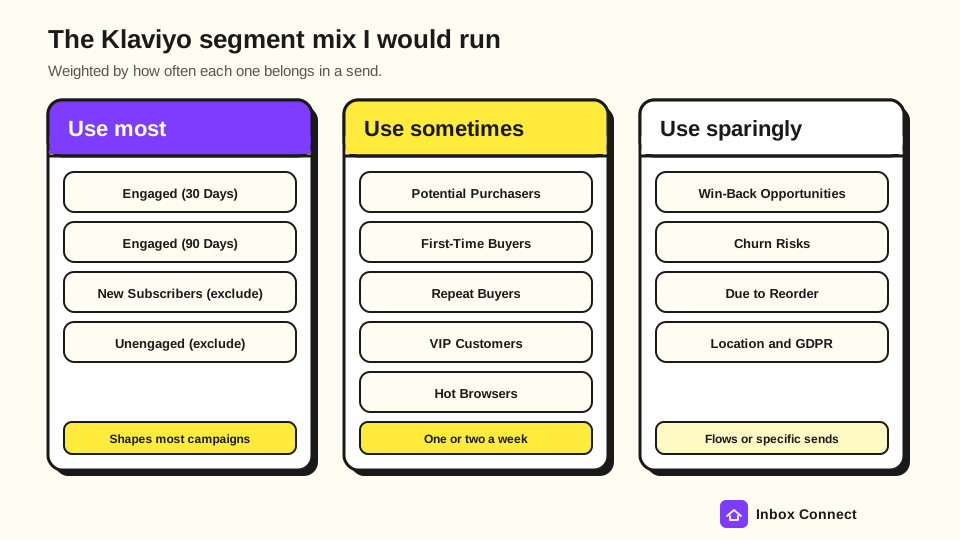
The segment mix I'd run
You don't need to email all 12 segments every week. Here's how I'd weight them:
- Use Most: Engaged (30 Days) and Engaged (90 Days) as send audiences, with New Subscribers and Unengaged as standing exclusions. These shape most of the campaigns you send.
- Use Sometimes: Potential Purchasers, First-Time Buyers, Repeat Buyers, VIP Customers, and Hot Browsers. Pick one or two per week where the offer fits.
- Use Sparingly: Win-Back Opportunities, Churn Risks, Due to Reorder, and location or GDPR segments. These work best inside flows or for occasional, specific campaigns.
Pro tip: When a campaign has a clear offer, start from the purchase segment it fits and then add AND Engaged (90 Days). You get the right offer and a list that's still reading.
How Do You Know if Your Klaviyo Segments Are Working?
A segment is working when the same kind of campaign earns more per recipient, gets more clicks, and draws fewer unsubscribes and spam complaints than it did to your broad list. Open rate alone won't tell you, because Klaviyo notes that Apple Mail Privacy Protection inflates opens.
Klaviyo's segmentation benchmark gives a useful shape for a good segment, even though the data is from 2017. Its top segmented campaigns went to 5% or less of the list, used two or more conditions, and named a specific behavior with a timeframe.
Here's the review rhythm I'd use:
| When | What to check | What to do |
|---|---|---|
| The day after each send | Spam complaints and unsubscribes by segment | If a segment spikes, tighten its engagement condition before the next send |
| Weekly | Click rate and revenue per recipient for segmented vs broad sends | Move budget and send days toward the segments that earn more |
| Monthly | Segment sizes over time | A shrinking Engaged (30 Days) or growing Unengaged means your list health needs work |
| Quarterly | Every segment's definition and whether anything still uses it | Delete or rebuild segments nobody sends to |
Two timing details catch people out. Segments with relative time conditions like "in the last 30 days" drop people once every 24 hours, and a segment-triggered flow only admits people who join the segment after the flow goes live.
Pro tip: Before you send, compare the segment count with the campaign's estimated audience. Klaviyo's segment counts article explains the two differ because of send-eligibility rules, so a big gap is worth a look before you hit Schedule.
If you'd rather have someone set this up and run it with you, my team does exactly that as a Klaviyo agency for ecommerce brands. For the broader strategy beyond Klaviyo, start with my email list segmentation guide.
FAQ
How many segments should I have in Klaviyo?
There's no fixed number, but the 12 above cover what most stores send. Delete segments you don't use, because Klaviyo notes that inactive segments stop updating and clutter makes the right one harder to find.
Can you manually add someone to a Klaviyo segment?
No, you can't add profiles to a segment by hand, because membership comes only from its conditions. If you need a hand-picked group, add those people to a list and use If someone is in or not in a list as a condition.
How often do Klaviyo segments update?
Klaviyo segments update close to real time when someone takes a qualifying action. Changes caused only by time passing, like falling out of "last 30 days", are applied once every 24 hours, and a manual refresh can take up to 15 minutes.
Should my welcome flow use a list or a segment?
Trigger your welcome flow from the list your sign-up form feeds, since joining that list is the moment someone subscribes. Then use the New Subscribers segment to keep those people out of campaigns while the series runs.
Can a Klaviyo segment trigger a flow?
Yes, a segment can trigger a flow, and new segment-triggered flows use No re-entry by default, so each profile enters once. People already in the segment when you publish the flow won't enter, and a manual segment refresh won't push them in either.
Final Thoughts
You came here to learn how to segment your list in Klaviyo, and you now have the difference between lists, segments, and flow filters, the exact build steps, the AND and OR rules, 12 segments with real conditions, and a way to check they're paying off. The short version: add a consent condition to every segment, read your connectors out loud, and judge segments on clicks and revenue per recipient, not opens.
My recommendation for this week is specific. Open Lists & segments, check which defaults you already have, then build Unengaged and exclude it from your next campaign to Engaged (90 Days).
Once that's running, add First-Time Buyers and send them one campaign aimed at the second order. If you want a second pair of eyes on your segments and flows, the free Email DDx audit reviews your Klaviyo account and gives you a ranked list of fixes.
Russ