
Most store owners who ask me who sets up Klaviyo flows don't actually need help writing emails. They need someone to set up Klaviyo flows properly the first time, and that job goes to one of four people: you, Klaviyo's own services team, a freelancer, or a Klaviyo partner agency.
If you've had the flow library open for a week and still can't decide whether to build it yourself or hire it out, that's a fair place to be. Klaviyo's getting started guide for flows names the four to set live first, in order: welcome series, abandoned cart, post-purchase, and winback.
Those four sit closest to the money. Every week one is missing or half-built, abandoned carts and first-time buyers go without a follow-up.
Here's the short answer, followed by how the four options compare and what I'd check before giving anyone access to your account.
tl;dr
- Build it yourself if you have the hours and fewer than five flows to launch.
- Klaviyo's flow build service builds to your specs, so you still bring the plan (its strategy help is a separate package).
- A freelancer suits a defined, one-off build. A partner agency suits strategy, build, and ongoing upkeep.
- Whoever you hire, give them a Manager role, never Owner, and get a written handover.
In this article
- Who sets up Klaviyo flows for most D2C brands?
- Four ways to get your Klaviyo flows built
- When setting up flows yourself makes sense
- What a Klaviyo flow setup should include
- How do you vet a Klaviyo freelancer or agency?
- Give your flow builder the right Klaviyo access
- Write a brief before you hire anyone
- What you should own after the handover
- FAQ
- Final Thoughts
Who sets up Klaviyo flows for most D2C brands?
For most D2C brands, Klaviyo flows get set up by the founder or a marketer in-house at first, then by a freelancer or a Klaviyo partner agency once the store has enough traffic that a weak flow costs real money. Klaviyo's own services team is the fourth option, and it's the one people forget exists.
The right pick comes down to three things. How much of your own time you can give it, whether you already know which flows you want, and whether you need someone around after launch.
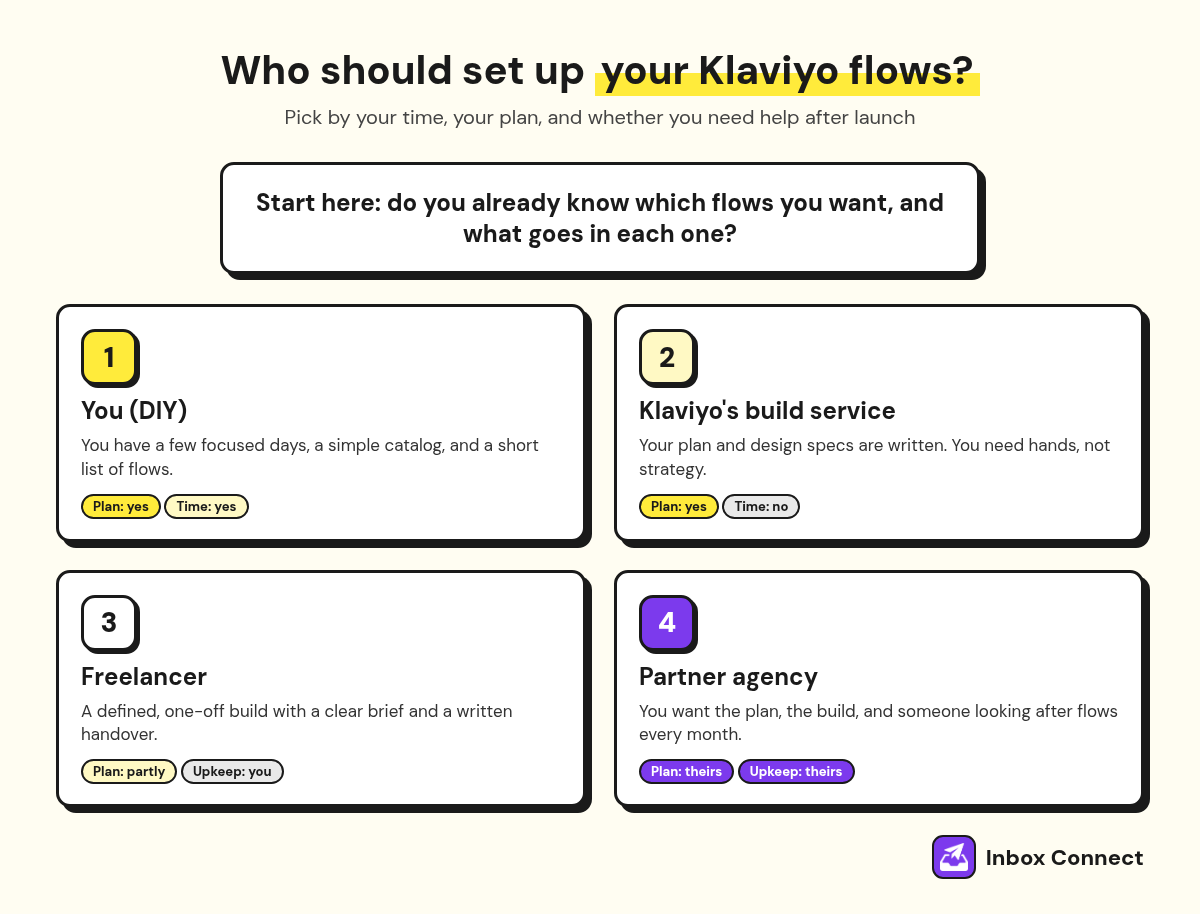
That last question trips people up. A flow isn't finished the day it goes live, because your products, offers, and list all change underneath it.
Four ways to get your Klaviyo flows built
You can get Klaviyo flows built by doing it yourself, buying a build from Klaviyo, hiring a freelancer, or hiring a partner agency. Each one hands you a different amount of strategy, and that's the part most comparisons skip.
| Who builds it | Best for | What you still own | Watch out for |
|---|---|---|---|
| You (DIY) | New stores, tight budgets, simple catalogs | Everything: plan, copy, design, testing | Flows copied from the library and never tuned |
| Klaviyo flow build service | Brands that already know what they want | The strategy and the design specs, unless you also buy Klaviyo's separate strategy package | It builds to your specs, so a vague brief gets a vague flow |
| Freelancer | A defined, one-off build | Strategy unless you pay for it, upkeep after launch | Disappearing after handover, no documentation |
| Partner agency | Strategy plus build plus upkeep | Approvals and brand decisions | Long contracts and junior staff doing the work |
Klaviyo's Professional Services menu includes standard and premium onboarding, implementation help, digital strategy, and a flow build service that builds flows to your design specs right inside your account. Strategy is sold as its own package, so the build service on its own is a useful option if your plan is already written down.
If it isn't, you're paying someone to build exactly what you asked for. And if what you asked for was "a welcome flow," that's roughly what you'll get.
Pro tip: Before you compare options, write down the four flows Klaviyo suggests setting live first and mark which ones you already have running. That list tells you whether you need a full build or a fix.
When setting up flows yourself makes sense
Set up Klaviyo flows yourself when your store is new, your catalog is simple, and you can block out a few focused days for the build and testing. Klaviyo's flow library gives you pre-built versions of the core flows, so you aren't starting from a blank canvas.
The trap with DIY isn't the building. It's switching on a library flow, seeing a few orders come in, and never touching it again.
Weak: Turn on the pre-built welcome flow, keep the sample copy with your logo swapped in, and set it Live the same afternoon.
Strong: Start from the library flow, rewrite every email for your product, add a filter so buyers leave the series, preview each message, then set it Live.
If you're going the DIY route, my email automation strategy guide walks through the build order, timing, and filters I use. If you get halfway and decide you'd rather hand it off, the sections below cover who to hire and what to ask them.
Pro tip: Put a hard deadline on DIY. If your welcome and abandoned cart flows aren't live within two weeks, hire someone for those two and keep the rest for yourself.
What a Klaviyo flow setup should include
A Klaviyo flow setup should include the flow map, every email written and designed for your brand, triggers and filters set correctly, testing, and a written handover. Anyone you hire to set up Klaviyo flows should be able to tell you, flow by flow, what they'll deliver.
Here's what I'd expect in a first build for an ecommerce store.
| Flow | What starts it | What a proper build delivers |
|---|---|---|
| Welcome series | Joining your main list | Emails written for new subscribers, buyers filtered out, signup offer delivered in email one |
| Abandoned cart | Starting checkout | Timed reminders, a filter that exits anyone who orders |
| Browse abandonment | Viewing a product | A lighter reminder, filters for people already in cart or checkout flows |
| Post-purchase | Placing an order | Separate paths for first-time and repeat buyers |
| Winback | No repeat order after a set time | Timing based on how often your customers actually reorder |
On one job, an Australian dog food startup needed every one of these mapped and built from scratch: welcome, browse abandonment, abandoned checkout, post-purchase, and win-back.
The build was the easy part. Agreeing on who each flow was for, and what should stop it, is what made it work.
If you want to judge the emails inside each flow, I've written up what goes in a welcome email sequence, an abandoned cart email sequence, and a post-purchase email sequence. Use them as a yardstick when a builder sends drafts for review.
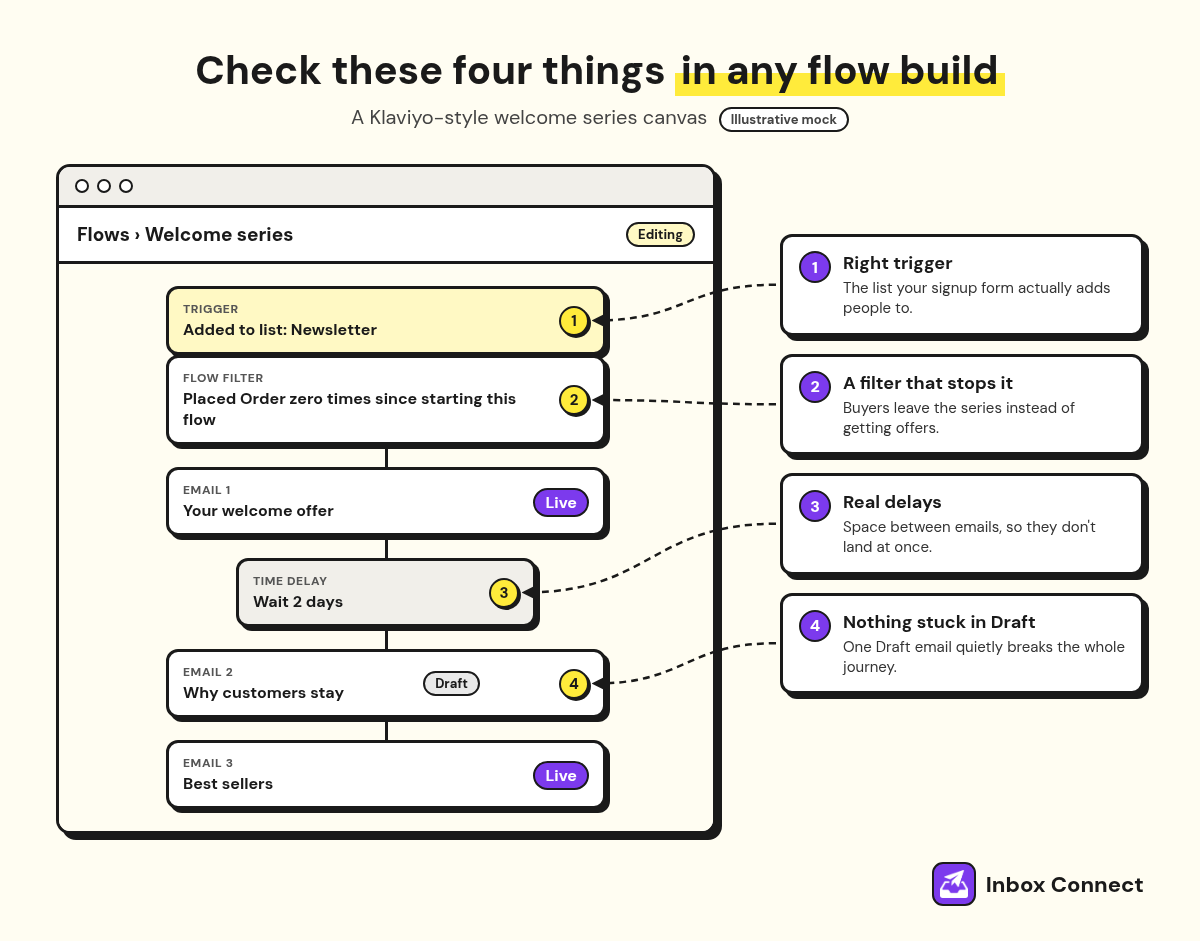
The figure shows what I check first when I open someone else's build. Trigger, flow filter, delays, and whether every message is actually set Live rather than left sitting in Draft.
Pro tip: Ask whoever builds your flows to keep each new flow in Draft until you've previewed every email. Klaviyo lets you set flow messages to Draft, Manual, or Live, so nothing sends before you've signed off.
How do you vet a Klaviyo freelancer or agency?
You vet a Klaviyo freelancer or agency by asking them to walk you through a live flow they built, explain why each filter is there, and show their listing in Klaviyo's partner directory if they claim partner status. A screen share of real work tells you more than any portfolio PDF.
The partner badge is worth reading closely, and you can look any partner up in Klaviyo's partner directory. Most badges pair a tier with a track, like Platinum Master or Platinum Advisor, and the track is the half that matters for a flow build.
Klaviyo Academy splits partners into two tracks: Master partners provide managed Klaviyo services for clients, while Advisor partners refer business to Klaviyo but don't actively manage client accounts.
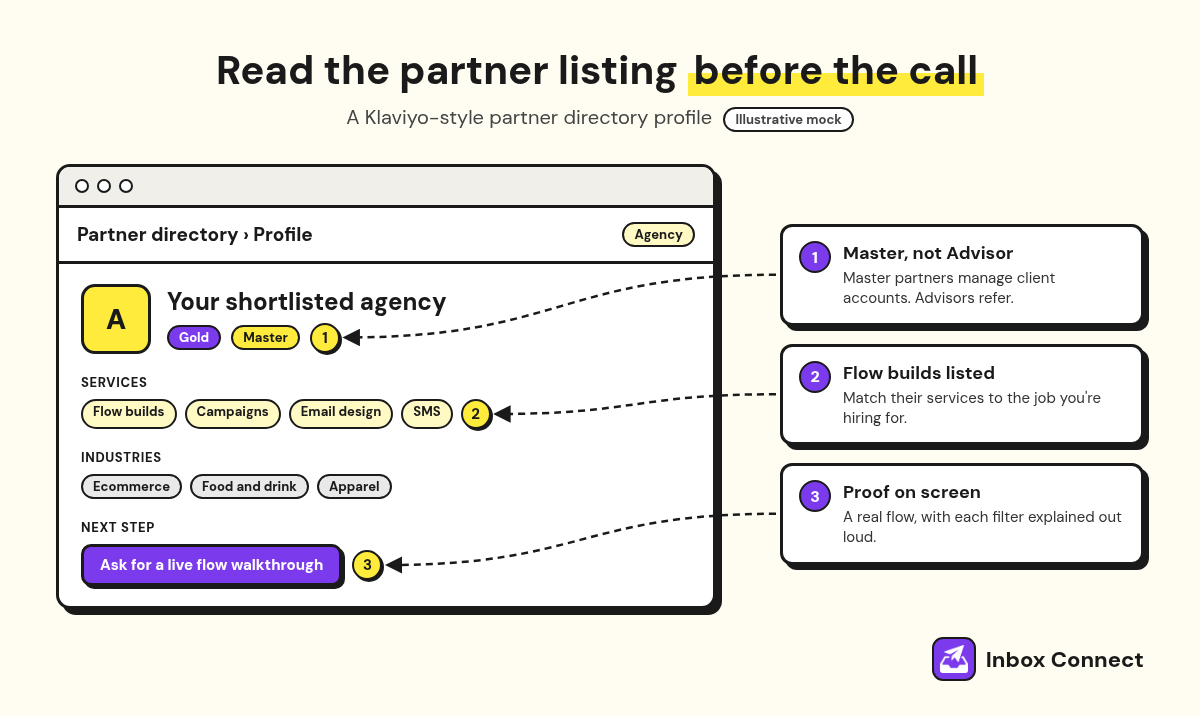
So if you want someone to actually build and run your flows, look for "Master" on the profile. A freelancer without a listing can still be good, but then the walkthrough has to carry all the weight.
Here's how the three outside options usually compare.
| What you're checking | Klaviyo's flow build service | Freelancer | Partner agency |
|---|---|---|---|
| Writes the strategy | No, builds to your specs (strategy is a separate Klaviyo package) | Sometimes, ask | Usually |
| Writes the email copy | Ask | Often | Usually |
| Stays after launch | Separate package | Rarely by default | Usually, on a retainer |
| Proof to ask for | Scope document | Live flow walkthrough | Partner listing plus walkthrough |
For a ranked shortlist with costs, see my roundup of Klaviyo agencies for ecommerce. If you're still weighing an agency against a freelancer or an in-house hire across your whole email program, my guide to hiring an email marketing agency covers that bigger call.
Pro tip: Ask the person who'll actually build your flows to join the sales call. If the agency can't tell you their name, assume it'll be whoever has a gap that week.
Give your flow builder the right Klaviyo access
Give whoever sets up your Klaviyo flows a Manager role, keep Owner for yourself, and remove their access the day the work ends. Klaviyo's user roles reference says an account has only one Owner, who can close the account, while Managers get the core features but can't export recipient activity or add and delete users.
That's the right shape for a flow build. They can build and edit flows, and they can't walk off with your customer list.
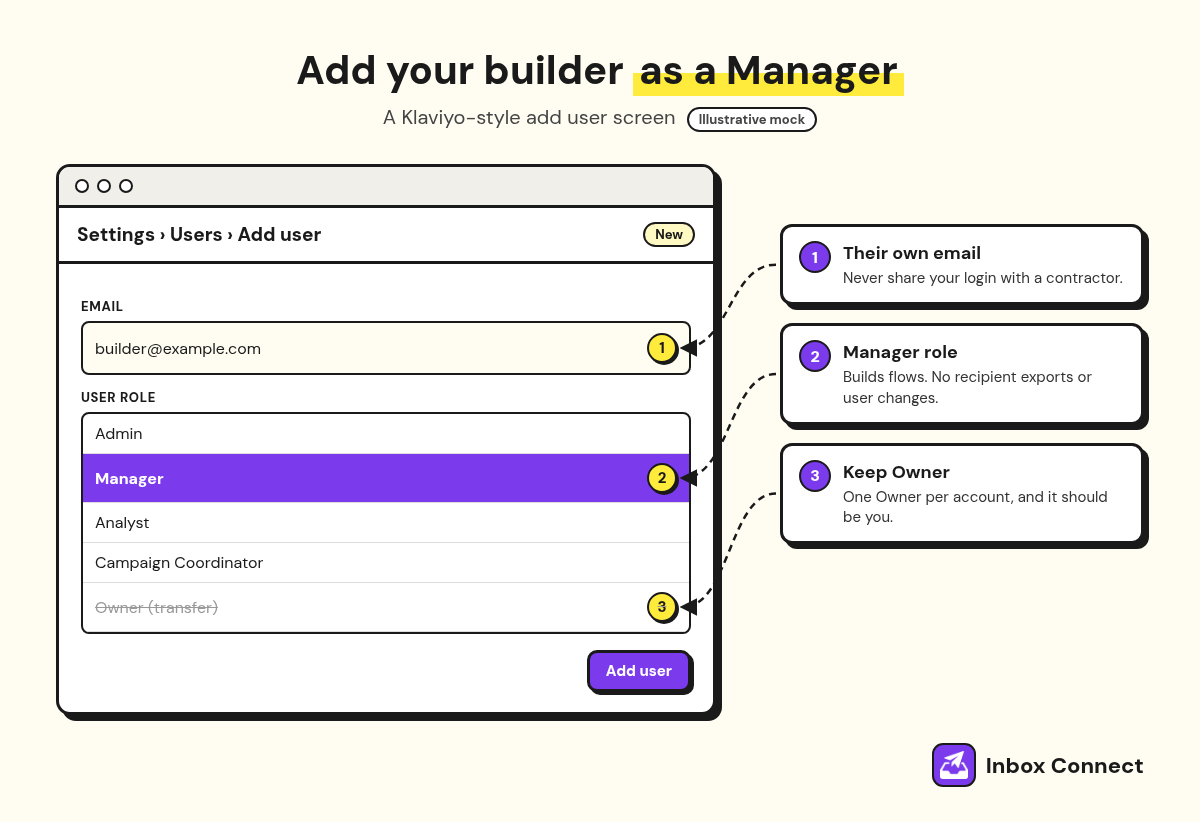
| Role | Can build flows? | What to know before you assign it |
|---|---|---|
| Owner | Yes | One per account, can close it. Never hand this over. |
| Admin | Yes | Can add or delete users and cancel billing. Too much for most builders. |
| Manager | Yes | Core features, no recipient exports, no user management. The usual pick. |
| Campaign Coordinator | No, edits message content only | Fine for a copywriter working inside existing flows. |
| Analyst | No, view only | Good for someone auditing results. |
Weak: Send your builder your own Klaviyo login, or transfer Owner "just for the setup."
Strong: Add them as a user with the Manager role under their own email. If a setup step needs more access, raise it for that job, then drop them back to Manager.
Pro tip: Put a reminder in your calendar for the day the project ends to review users. Old contractor logins are the easiest thing in an account to forget.
Write a brief before you hire anyone
Write a one-page brief before you hire anyone to set up Klaviyo flows, listing which flows you want, who each one is for, any offers you'll use, and how you'll judge it's working. The brief is what turns "build me some flows" into a quote you can compare.
It also protects you. Freelancers, agencies, and Klaviyo's flow build service will all build to whatever you hand them.
Weak: "We need Klaviyo flows set up. Can you send a quote?"
Strong: "We need a welcome series and abandoned cart flow live first, then post-purchase. New subscribers get 10% off. Our average customer reorders every 60 days. We'll judge it on flow revenue and placed order rate after 30 days."
Those numbers are yours to fill in, of course. The point is that a builder reading the strong version can tell you exactly what they'll deliver and when.
Questions I'd put to anyone before signing:
- Strategy: Who decides which flows to build and what goes in each email?
- Copy and design: Are the emails written for my brand, or adapted from templates?
- Testing: How do you test a flow before it goes Live?
- Handover: What documentation do I get when you're done?
- After launch: Who fixes a flow that breaks next month, and is that in scope?
What you should own after the handover
After the handover, you should own a written flow map, the reasoning behind every trigger and filter, and full control of the account with your builder's access removed or reduced. If you can't explain why a flow exists, you don't really own it yet.
I ask for the same five things at the end of every build.
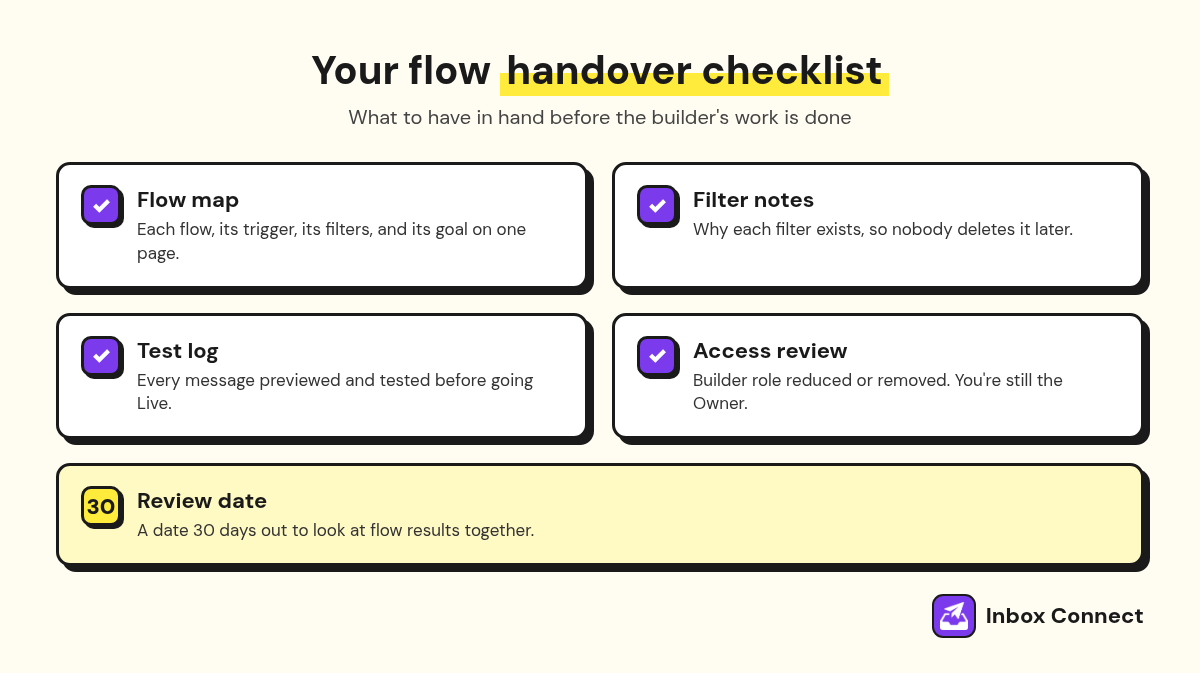
- Flow Map: One page listing each flow, its trigger, its filters, and its goal.
- Filter Notes: A line on why each filter exists, so nobody deletes it later by accident.
- Test Log: Proof each flow was previewed and tested before going Live.
- Access Review: Builder roles reduced or removed, with you still the Owner.
- Review Date: A date 30 days out to look at flow results together.
If your flows already exist and you're not sure they're doing their job, that's a different problem from a fresh build. My email automation audit guide walks through how I check an existing setup.
Pro tip: Save the flow map somewhere outside Klaviyo, like a shared doc. If you ever change builders, the next person starts from your notes instead of guessing.
FAQ
Who sets up Klaviyo flows for a D2C brand?
Usually the founder or an in-house marketer at first, then a freelancer or Klaviyo partner agency as the store grows. Klaviyo also sells its own flow build service, which builds flows to the specs you provide.
Should I hire a freelancer or an agency to set up Klaviyo flows?
Hire a freelancer for a defined, one-off build where you already know what you want. Hire an agency when you need the strategy, the build, and someone to keep the flows working after launch.
Does Klaviyo set up flows for you?
Yes, Klaviyo offers a flow build service through its Professional Services team, and it builds flows to your design specs. Strategy is a separate Klaviyo package, so with the build service alone you still decide what each flow should do.
What access should I give someone setting up my Klaviyo flows?
Give them the Manager role under their own email. Managers can build flows but can't export recipient activity or manage users, and you stay the account Owner.
How many flows should a new Klaviyo account start with?
Start with the four Klaviyo suggests setting live first: welcome series, abandoned cart, post-purchase, and winback. Add browse abandonment and others once those are running well.
Final Thoughts
Start by listing which of the four core flows you already have live, then write the one-page brief before you talk to anyone. That brief tells you whether you need a DIY weekend, Klaviyo's build service, a freelancer, or an agency.
If you'd rather hand the whole thing to someone who'll plan, build, and look after your flows, Inbox Connect's Klaviyo agency does exactly that. Either way, you now know who sets up Klaviyo flows, what a good build includes, and how to hire without giving away your account.
Russ